A Polymarket trading bot is more than a Python or TypeScript script running continuously on a server. Once the bot is allowed to place real orders, the machine running it may contain a wallet private key, CLOB API credentials, trading logic, position information, WebSocket sessions, logs, configuration files, and access to real funds. That makes security part of the trading infrastructure rather than an optional system-administration task.
The most dangerous mistake is assuming that a Polymarket API key works like a disposable market-data token. Polymarket uses a two-level authentication model. At the first level, or L1, the wallet private key proves ownership through EIP-712 signatures and is used to create or derive API credentials and sign orders. At the second level, or L2, an API key, secret, and passphrase authenticate private CLOB requests using HMAC-SHA256. Even with L2 authentication, creating an order still involves user-side signing, which means the signing private key remains one of the most sensitive secrets in the entire bot architecture.
That has an important security consequence: protecting only the VPS password is not enough. A properly secured Polymarket bot needs multiple defensive layers around the wallet, secrets, operating system, dependencies, logs, remote access, network exposure, trading limits, backups, and incident response. If any one of these layers is weak, a technically stable bot can still become an unsafe trading system.
This guide provides a practical Polymarket bot security checklist for 2026, focused on the areas that matter most when a bot is running continuously on a VPS: wallet isolation, .env files, API credentials, log hygiene, Linux or Windows hardening, network access, secret management, monitoring, and what to do if a server or credential is compromised.
1. Start With the Wallet: Never Treat the Bot Like Your Main Wallet
The most important security decision is made before the bot starts: which wallet the automation is allowed to control.
A production trading bot should generally use a dedicated wallet created specifically for automation, not the same wallet that stores unrelated assets or long-term holdings. The reason is simple. If a private key must exist on a server so that orders can be signed automatically, that key should control only the capital the strategy genuinely needs. This turns wallet separation into a form of risk containment. A compromise remains serious, but the potential damage is limited to the automated trading wallet rather than spreading to everything owned by the user.
Polymarket’s current authentication model makes this especially relevant because the private key is involved in L1 authentication and order signing. L1 proves wallet ownership and is used to create or derive the L2 API credentials used for authenticated CLOB requests. Polymarket’s official developer material also distinguishes the signer from the funder/proxy wallet structure, including EOA, Polymarket proxy, and Gnosis Safe-style account configurations.
For production automation, think in terms of a hot-wallet budget. Instead of placing all available trading capital under one server-controlled key, hold only the amount required for the strategy’s planned exposure plus a reasonable operating buffer. Replenish deliberately rather than automatically giving the bot access to an unnecessarily large balance. This is similar to how exchanges, payment systems, and crypto infrastructure separate hot operational wallets from deeper reserves.
A bot wallet should also be isolated from development. Developers often run experiments, install packages, execute scripts, paste commands from documentation, and enable debugging. That environment naturally has a larger attack surface than a stable production machine. A safer architecture is to use one wallet for paper or development work and a different, limited wallet for production trading. Never copy a production private key onto a personal development laptop simply because testing is easier there.
The wallet layer should therefore follow a few basic rules:
- Use a dedicated automation wallet.
- Keep only the trading capital that the bot needs.
- Do not reuse the wallet for unrelated DeFi, NFT, exchange, or personal activity.
- Do not paste the private key into chat tools, tickets, GitHub issues, screenshots, or shell history.
- Keep an offline recovery record in a location separate from the VPS.
- If the bot supports configurable maximum exposure, order size, daily loss, or position limits, treat those as security controls as well as strategy controls.
A trading loss comes from market behavior. A wallet-security failure comes from infrastructure design. The defenses should account for both.
2. Understand Which Polymarket Credentials Are Actually Sensitive
A secure setup starts by distinguishing identifiers from secrets.
A wallet address is public by design. A private key is not.
An API key identifier may appear in authentication configuration, but the associated secret and passphrase must also be protected. Polymarket’s L2 authentication uses an API key, secret, and passphrase, and authenticated requests are signed using HMAC-SHA256. Those credentials allow private account operations such as working with open orders, cancellations, account balances, and authenticated trading flows.
A production configuration can therefore contain several sensitive values at once:
| Credential | Sensitivity | Typical role |
|---|---|---|
| Wallet address | Public | Identifies signer/account |
| Private key | Critical | L1 signing and order signing |
| CLOB API key | Sensitive | Identifies L2 credential set |
| CLOB API secret | Critical | Creates authenticated request signatures |
| CLOB passphrase | Critical | Part of L2 authentication |
| Builder credentials | Critical | Builder attribution/relayer authentication where used |
| RPC/API provider keys | Sensitive | External infrastructure access |
| AI API keys | Sensitive | External research or agent services |
| Telegram/Discord tokens | Sensitive | Notifications/control integrations |
| Database passwords | Critical | Persistent bot state |
Do not place all of these values in one configuration file simply because it is convenient.
If a bot only needs public market discovery or orderbook information, it should not load the wallet private key at all. Public CLOB, Gamma, and market-data workflows do not require full trading authentication for every request. Authentication should be introduced only in the process that needs it. Polymarket’s current developer documentation distinguishes unauthenticated public market-data access from L1/L2 authenticated trading operations.
This leads to one of the strongest architecture patterns available to a Polymarket developer: separate market-data, strategy, and signing/execution responsibilities. A research process can consume public data without seeing the wallet key. A strategy process can decide what order it wants. A narrower execution process can hold the signing credential and accept only validated trade instructions. If the research or AI process is compromised, it does not automatically receive unrestricted wallet access.
For higher-value setups, builder credentials can also be kept on a separate signing service. Polymarket’s current agent/developer material explicitly documents remote builder signing, where builder credentials stay on a separate server and clients request signed headers rather than possessing those credentials locally.
3. Protect .env Files Like Password Vaults, Not Configuration Notes
Environment files are common because they are simple.
A typical bot may load values similar to:
PRIVATE_KEY=...
CLOB_API_KEY=...
CLOB_SECRET=...
CLOB_PASSPHRASE=...
FUNDER_ADDRESS=...
This is convenient, but convenience can create dangerous habits.
An .env file is usually plaintext. If an attacker, another system user, backup process, malware process, or accidentally published repository can read that file, encryption is no longer protecting the secret. The bot needs plaintext at runtime, which means operating-system access controls matter.
Polymarket’s earlier official Agents repository used a .env file containing values such as the Polygon wallet private key and OpenAI API key, illustrating how commonly bot projects use environment-based configuration. That repository was archived in May 2026, so developers should not treat it as the current production architecture, but the security lesson remains useful: a convenience file can contain credentials powerful enough to trade or spend funds.
At an absolute minimum, production projects should include .env in .gitignore.
But .gitignore is not a complete security control.
It only prevents normal Git tracking. It does not protect the file from:
- another user on the server,
- a compromised application,
- a careless ZIP backup,
- shell scripts,
- support uploads,
- IDE synchronization,
- CI/CD artifacts,
- or accidental manual copying.
On Linux, restrict .env permissions so that only the account running the bot can read it. A common approach is a dedicated service account with restrictive file ownership rather than running the bot as root. The exact permission model depends on deployment, but the principle is simple: the bot account should read its secrets; unrelated accounts should not.
Separate secrets from non-sensitive configuration. Strategy settings such as market filters, maximum spread, order size, refresh intervals, and WebSocket endpoints can live in a normal configuration file. The private key should not need to sit next to them. This makes it easier to commit and back up configuration safely without copying secrets.
For stronger production environments, move beyond .env entirely and use a secrets-management system, encrypted keystore, or remote signing architecture. A plaintext .env can be acceptable for a tightly controlled small deployment, but it should be recognized for what it is: plaintext storage protected mainly by the operating system.
4. Logs Are One of the Most Common Places Bots Accidentally Leak Secrets
Developers often think about protecting configuration files but forget that logs can reproduce those same secrets.
This can happen surprisingly easily.
A debugging statement may print an entire configuration object:
console.log(config)
A failed API request may dump request headers.
An exception handler may include environment variables.
An HTTP client may log the complete authorization structure when debug mode is enabled.
A startup script may print the loaded private key to prove that it was found.
A developer may output API credentials once during testing and forget that those logs are retained for months.
For a Polymarket bot, production logs should never contain a complete private key, CLOB secret, passphrase, session credential, Builder secret, external API token, or database password.
Create explicit redaction.
Do not rely on remembering which log statements are safe.
A good structured logger should automatically mask fields containing names such as:
private_key
secret
passphrase
api_key
token
password
authorization
An existing Polymarket bot security implementation published in 2026 demonstrates this exact pattern, automatically masking fields such as private keys, API keys, tokens, and passwords before writing log metadata. Although this is a third-party implementation rather than a Polymarket platform guarantee, it represents the kind of defensive logging production bots should adopt.
Logs should focus on operational information instead:
- timestamp,
- market/token identifier,
- strategy decision,
- order ID,
- order side,
- price,
- size,
- fill status,
- latency,
- reconnect events,
- position state,
- error category,
- health status.
Even wallet addresses may be masked when logs are uploaded to third-party monitoring platforms. Addresses are technically public, but pairing them with server identifiers, exact strategies, balances, timestamps, and infrastructure details can expose operational information that does not need to be public.
Be especially careful with debug logging. Debug output is useful temporarily but should not remain permanently enabled in production. Verbose HTTP libraries and WebSocket clients sometimes expose far more than expected.
Logs also need rotation. A bot running continuously can create gigabytes of historical files. Configure log rotation based on time or size and define a retention policy. Keep enough history to investigate incidents, but do not retain sensitive operational data forever simply because disk space is available.
5. Harden the VPS Before You Put Real Wallet Credentials on It
A Polymarket VPS should be treated as a production server, not as a remote desktop that happens to run Python.
The first principle is minimize the machine.
Install only what the bot needs.
A clean Linux deployment may require Python or Node.js, Git if deployment uses it, a process supervisor or container runtime, monitoring, firewall tooling, and a few system utilities. It usually does not need a full desktop environment, browser extensions, office software, torrent clients, random developer tools, or unrelated web applications.
Every additional package increases complexity and potentially increases attack surface.
Create a dedicated unprivileged user for the bot. Do not run the trading strategy as root unless a very specific task requires elevated privileges. If the bot is compromised, an unprivileged account provides another boundary between the application and the operating system.
Apply operating-system security updates regularly. Security updates should be staged responsibly so they do not unexpectedly interrupt live trading, but ignoring patches indefinitely is not a safer alternative. Decide when maintenance can occur and document what should happen to working orders and positions before a reboot.
Disable unnecessary services. A production trading server does not need to expose a database, development server, Jupyter notebook, Redis port, Docker daemon, metrics endpoint, or debug dashboard directly to the public Internet unless there is a carefully designed reason.
The external attack surface should ideally be extremely small:
administration access in
Polymarket/API/WebSocket traffic out
monitoring alerts out
and very little else.
6. Lock Down SSH, RDP, Firewalls, and Network Access
The VPS login path deserves the same attention as the wallet.
For Linux servers, SSH key authentication is generally preferable to weak reusable passwords. Disable password login if your operational requirements allow it, disable direct root login, and protect the private SSH key on the administrator’s local machine.
If several people manage the bot, do not share one administrator credential. Separate accounts provide accountability and make access revocation easier.
For Windows deployments, use strong RDP credentials, keep Network Level Authentication enabled, and restrict inbound RDP exposure where possible. A firewall allowlist, VPN, zero-trust access layer, or provider-side firewall is preferable to leaving administrative ports open to the entire Internet.
Do not confuse “nonstandard port” with security. Moving SSH from port 22 or RDP from 3389 may reduce background scanning noise, but it does not replace authentication, firewall rules, or patching.
A sensible firewall policy is deny inbound by default and explicitly permit only what is necessary.
If the bot exposes a local web dashboard, bind it to 127.0.0.1 rather than 0.0.0.0 unless remote access is deliberately secured. Developers frequently create a monitoring panel on port 3000, 5000, 8000, or 8080 and accidentally make it publicly reachable.
The same applies to databases. PostgreSQL, Redis, MongoDB, and similar services should generally not be exposed directly to the Internet for a single-server bot architecture.
For outbound access, stricter environments can also restrict which destinations the bot may contact. At minimum, know what the software is expected to reach: Polymarket CLOB endpoints, WebSockets, required blockchain RPC providers, monitoring services, and any intentionally configured research or AI APIs.
This matters particularly for AI agents. A bot that can call arbitrary URLs, execute shell commands, read wallet credentials, and place orders has an enormous permission surface. Separate those capabilities whenever possible.
7. Separate Trading Logic From Signing and Give the Bot Less Authority
The principle of least privilege is especially valuable for automated trading.
Imagine one Python process that can:
- browse arbitrary websites,
- call an LLM,
- execute shell commands,
- install packages,
- read the private key,
- sign transactions,
- cancel every order,
- place unlimited orders,
- and transfer funds.
That architecture is convenient.
It is also difficult to secure.
A more defensive design separates responsibilities.
For example:
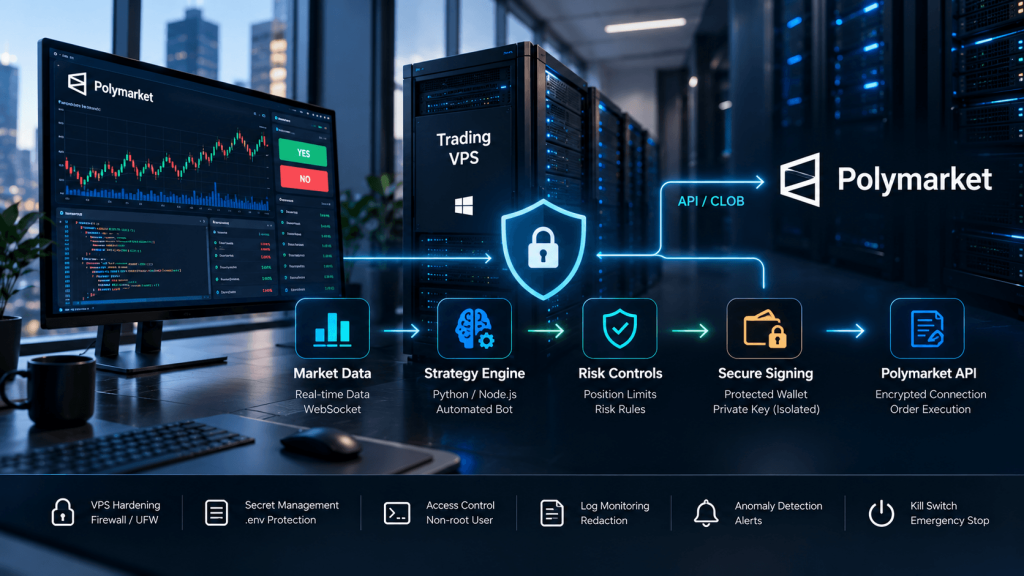
Market data process → Strategy process → Risk gate → Execution signer → Polymarket CLOB
The market-data process needs public API access.
The strategy process needs market data and current account state.
The risk gate needs intended order parameters and exposure limits.
Only the execution layer needs the private signing key.
That means a prompt-injection problem or compromised news parser does not automatically become a wallet compromise.
The risk gate should validate deterministic constraints before an order can be signed:
| Security control | Example |
|---|---|
| Maximum order size | Reject orders above $100 |
| Maximum total exposure | Reject if exposure exceeds configured limit |
| Maximum market exposure | Limit capital in one market |
| Price sanity | Reject impossible/outlier price |
| Market allowlist | Only trade approved markets |
| Daily loss limit | Stop new orders after threshold |
| Position count | Limit simultaneous positions |
| Duplicate detection | Reject repeated order intent |
| Trading mode | Paper / canary / live |
| Kill switch | Immediately stop new execution |
These protections should not depend on an LLM agreeing that the trade is sensible.
The AI may propose a trade.
Deterministic code should decide whether the order is permitted.
8. Use Polymarket Authentication Correctly Instead of Inventing Your Own Key Handling
Polymarket’s current CLOB authentication has two levels.
L1 authentication uses EIP-712 signatures from the wallet’s private key to prove wallet control and create or derive API credentials.
L2 authentication uses an API key, secret, and passphrase to authenticate private CLOB requests using HMAC-SHA256. Order creation still requires the order itself to be signed by the user-side signer.
Using the official client libraries is generally safer than rebuilding cryptographic signing manually unless there is a genuine need to do so. The current official ecosystem documents TypeScript, Python, and Rust SDK options and corresponding authentication patterns.
Do not print credentials returned by createOrDeriveApiKey() into production logs.
Do not paste them into source code.
Do not commit them.
Do not distribute one credential set across every development laptop.
If credentials are suspected to be exposed, rotate or recreate them according to the supported credential lifecycle. Polymarket’s current developer material documents creation, derivation, and revocation processes, including separate revocation mechanisms for builder keys.
Also make sure the bot uses the correct signer/funder/signature-type configuration. A surprisingly large number of “authentication failures” come from using the displayed proxy/funder address as though it were the signer key, or from using the wrong signature type for the account architecture. That is both an operational and security issue because rushed debugging often leads developers to start printing keys and account details.
9. Secure Dependencies, Docker Images, and Deployment Pipelines
A secure wallet can still be exposed by compromised software.
Bots frequently install dozens or hundreds of dependencies from npm or PyPI. Every dependency becomes part of the application’s trust chain.
Pin package versions instead of automatically installing an unbounded latest version every time the server starts. Review major dependency upgrades rather than applying them blindly. Remove packages that are no longer needed.
Avoid installing random GitHub repositories directly on the production VPS simply because they advertise Polymarket integration.
Review the code first.
This matters because a malicious package running under the same operating-system account as the bot can potentially read:
- environment variables,
.env,- wallet files,
- API credentials,
- logs,
- SSH keys accessible to the user,
- and configuration databases.
If using Docker, do not assume containers automatically solve the problem. A container receiving the private key as an environment variable still has the private key. A container running as root, mounting the Docker socket, or mounting the entire host filesystem can create serious risk.
Use minimal images, run containers as non-root where practical, restrict volume mounts, and avoid mounting more host directories than required. Secrets should be delivered narrowly rather than copied into the image.
Never bake production secrets into a Docker image.
An image can later be pushed to a registry, exported, cached, copied to another server, or inspected by another administrator.
CI/CD systems deserve similar scrutiny. A GitHub Actions workflow, GitLab runner, or other deployment system that can read the production wallet key becomes part of the security boundary. In many smaller deployments, the safest configuration is to deploy code without letting the CI platform possess the wallet private key at all.
10. Monitoring Should Detect Security Problems, Not Just Bot Crashes
A strong monitoring setup looks for anomalies.
Server monitoring should include:
- unexpected CPU spikes,
- memory exhaustion,
- disk filling,
- unusual process creation,
- repeated SSH/RDP login attempts,
- unexpected service restarts,
- network failures,
- and bot process health.
Trading monitoring should include:
- orders outside expected strategy times,
- order sizes above normal range,
- sudden increases in order frequency,
- repeated rejected orders,
- positions that differ from the strategy state,
- unexpected market IDs,
- changes in wallet balance,
- and failure to cancel or reconcile orders.
This is where operational security and trading risk overlap.
Suppose a strategy normally submits one order every ten minutes and suddenly submits 300 orders in one minute.
That could be:
- a coding bug,
- reconnect loop,
- corrupted state,
- duplicate worker,
- malicious action,
- or runaway AI agent.
From the system’s perspective, all should trigger an alert.
Monitoring should therefore understand what “normal” means.
Use deterministic thresholds.
Send alerts to a separate channel such as email, Telegram, Discord, PagerDuty, or another monitoring service, but secure those credentials too. Notification tokens are lower risk than a wallet key, but they should still not appear in public code.
11. Build Reconciliation and a Kill Switch Into the Bot
A Polymarket bot needs a reliable way to answer:
What does the exchange believe my state is right now?
Do not rely entirely on local memory.
If the server restarts, the process crashes, the WebSocket disconnects, or an order response is lost, local state may differ from actual open orders and positions.
Periodically reconcile:
local open orders ↔ Polymarket open orders
local fills ↔ account trades
local positions ↔ actual account positions
local balance ↔ current available balance
If the states disagree, the bot should enter a safe mode rather than blindly continuing.
The system should also have a kill switch that blocks new orders without requiring code changes or a server shutdown. That can be implemented as a protected configuration flag, control endpoint restricted to localhost, administrative command, or external risk signal.
Stopping the process is not always enough because working orders may remain live.
A proper incident workflow needs to answer both:
How do I stop creating new orders?
and:
How do I cancel existing working orders?
Polymarket’s current API includes endpoints to cancel individual orders, multiple orders, market-specific orders, or all working orders. The current API index also exposes a heartbeat endpoint that can be used as part of more robust order-lifecycle handling.
A kill procedure should be documented before it is needed.
12. Compliance Is Part of Production Security
A VPS should never be treated as a tool for hiding a user’s location or circumventing platform restrictions.
Polymarket’s current documentation explicitly instructs builders to check geographic eligibility before placing orders. Orders submitted from blocked regions can be rejected, and Polymarket provides a geoblock endpoint so applications can determine the geographic status associated with the requesting IP.
The documentation currently distinguishes jurisdictions that are blocked completely, jurisdictions that are close-only through both the frontend and API, and a smaller group where the frontend is close-only while API trading itself is not restricted.
The security implication is important.
A production bot should perform a compliance/geoblock check at startup and after significant infrastructure changes such as moving the VPS or changing network providers.
The VPS location does not override restrictions that apply to the actual trader, entity, residency, KYC status, or applicable law.
Hosting location should be chosen for reliable and permitted infrastructure, not for bypassing restrictions.
Polymarket’s current documentation identifies its primary infrastructure in AWS eu-west-2 and lists eu-west-1 as the closest non-georestricted region.
For eligible users, that makes European infrastructure relevant from a technical-latency perspective, but compliance remains a separate requirement.
13. What a Hardened Polymarket VPS Architecture Can Look Like
A practical secure deployment does not need to become enterprise-scale.
For a single independent trader, the architecture might be:
Dedicated trading wallet
↓
Secret storage / protected environment
↓
Unprivileged bot service account
↓
Market-data process
↓
Strategy process
↓
Deterministic risk controls
↓
Signing/execution process
↓
Polymarket CLOB
Alongside that pipeline:
system monitoring
log redaction
order reconciliation
security updates
restricted SSH/RDP
firewall
backups
kill switch
A full VPS is useful because it allows continuous WebSocket connections, persistent state, databases, monitoring, Python or Node.js services, and independent execution without relying on a home PC.
For eligible global Polymarket automation, TradingVPS locations such as Dublin and Amsterdam can be practical European hosting options for running Python, Node.js, Docker, WebSocket connections, databases, and monitoring services. Polymarket’s own current infrastructure documentation identifies AWS eu-west-2 as the primary server region and eu-west-1 as the closest non-georestricted region, giving Dublin in particular a clear geographic infrastructure rationale.
A VPS should still be selected on more than latency.
For bot security, important infrastructure characteristics include:
- dedicated IPv4,
- modern CPU resources,
- sufficient RAM,
- NVMe storage,
- stable networking,
- firewall control,
- operating-system access,
- backup capability,
- monitoring,
- and a clear process for credential rotation if the server must be replaced.
Infrastructure reduces operational risk.
It does not replace application security.
Polymarket Bot Security Checklist
Before enabling real trading, review the complete stack rather than only checking whether the bot starts successfully.
| Security Area | Production Check |
|---|---|
| Wallet | Dedicated bot wallet |
| Capital | Only required trading funds stored in hot wallet |
| Private key | Never hard-coded or committed |
.env | Gitignored and permission-restricted |
| API credentials | Stored as secrets, not logged |
| Logs | Private keys/API secrets automatically redacted |
| Runtime user | Bot does not run as root/admin unnecessarily |
| SSH/RDP | Restricted and strongly authenticated |
| Firewall | Default-deny inbound policy |
| Public ports | No unnecessary dashboards/databases exposed |
| Dependencies | Reviewed and version-pinned |
| Docker | No secrets baked into image |
| Risk controls | Order/exposure/daily-loss limits enforced |
| Execution | Strategy separated from signer where practical |
| Reconciliation | Orders/positions periodically verified |
| Monitoring | Server + trading anomalies monitored |
| Kill switch | Tested before production |
| Backups | Config/state backups exclude raw secrets |
| Updates | OS and critical libraries patched |
| Geo check | Eligibility checked before order placement |
| Incident plan | Credential rotation and order-cancel procedure documented |
The checklist should be repeated after major changes.
A secure machine can become insecure after installing a new dashboard.
A safe .env can become exposed after a careless backup.
A restricted firewall can become open after a provider migration.
Security is a state that needs to be maintained.
Frequently Asked Questions About Polymarket Bot Security
A protected .env file is commonly used for smaller deployments, but it remains plaintext secret storage. At minimum, keep it out of Git, restrict filesystem access, and never include it in support bundles or backups. Higher-value production systems should consider encrypted secret storage or a dedicated signing service.
A dedicated limited-funds automation wallet is generally safer because compromise is contained to the capital intentionally allocated to that trading system.
No. Containers can improve isolation, but a container receiving unrestricted secrets or privileged host access can still expose the wallet. Container permissions and mounts need to be designed carefully.
Prefer architectures where AI analysis and strategy reasoning are separated from the signing component. Deterministic execution code should enforce risk limits before any trade is signed.
Treat the wallet as compromised. Stop the bot, cancel active orders where possible, move remaining assets to a new secure wallet according to the relevant account architecture, rotate associated credentials, rebuild the server if compromise is suspected, and investigate how the key leaked before resuming automation.
Final Thoughts: A Secure Polymarket Bot Should Assume Something Will Eventually Fail
A good Polymarket bot is designed not only for the normal case but also for compromised credentials, disconnected WebSockets, server reboots, failed API calls, bad deployments, duplicate processes, corrupted state, malicious dependencies, and human mistakes.
The strongest security posture is built around limiting authority.
Do not give a bot wallet more capital than it needs.
Do not give a research process the private key if it only needs public data.
Do not let an AI model bypass deterministic exposure limits.
Do not make a monitoring dashboard public simply because remote access is convenient.
Do not store every secret in one plaintext file.
Do not allow logs to become a second credential database.
Do not run everything as root.
And do not assume a server is safe merely because nobody has attacked it yet.
Polymarket’s current authentication design separates L1 wallet signing from L2 API authentication, which gives developers useful building blocks for separating responsibilities. A production bot should extend that separation into the rest of its architecture: public market data, strategy logic, risk management, execution signing, monitoring, and administrative access should not all have identical permissions.
For many independent traders, the practical goal is not a complicated enterprise cybersecurity stack. It is a small, understandable system with a limited wallet, protected secrets, restricted VPS access, safe logs, deterministic risk controls, reliable monitoring, and a tested kill procedure.
The final question before enabling live automation should therefore not be:
“Does the bot work?”
It should be:
“If this bot, server, dependency, key, or network connection fails, what can happen—and how much authority does the failure have?”
If the answer is “the entire wallet can be emptied, every order can be replaced, and I may not notice for hours,” the system needs more hardening.
A secure production design should make failures smaller, visible, and recoverable.
That is the real purpose of wallet isolation, .env protection, log redaction, VPS hardening, risk limits, and continuous monitoring.
This article is provided for general technical and security education only and does not constitute financial, investment, legal, compliance, or cybersecurity consulting advice. Prediction-market access and API availability vary by jurisdiction. Developers should verify current Polymarket documentation, local requirements, account eligibility, and platform restrictions before deploying automated trading systems.