TradingView and Tradovate are often compared as if a futures trader has to choose one or the other, but that is not quite how the two platforms fit together.
TradingView is primarily an advanced charting, technical-analysis, alerting, and Pine Script environment that can connect directly to supported brokers, including Tradovate. Tradovate is a cloud-based futures trading platform and brokerage ecosystem built around order execution, Depth of Market, account management, futures-specific tools, and features such as native Group Trade for multiple accounts. Tradovate officially lists TradingView as an integrated partner, allowing traders to view and manage Tradovate positions and orders through TradingView while continuing to use TradingView’s charting environment.
That creates an important distinction for futures traders in 2026.
If your priority is charting, custom indicators, Pine Script, alerts, multi-chart layouts, and visual market analysis, TradingView has the stronger specialization.
If your priority is native multi-account execution, grouped futures accounts, consolidated positions, DOM tools, and broker-level account management, Tradovate offers capabilities that do not fully transfer into the TradingView interface.
The practical question is therefore not simply:
“TradingView or Tradovate?”
It is:
“Which platform should handle my analysis, and which should handle my execution?”
For many active futures traders, the best answer may actually involve using both.
TradingView vs Tradovate: The Core Difference
TradingView’s main strength is its analytical environment. Its Supercharts support more than 20 chart types, advanced layouts, technical and fundamental indicators, drawing tools, futures-specific settings, alerts, Bar Replay, and Pine Script strategies and indicators. TradingView says its community has created more than 100,000 custom Pine Script indicators, giving traders an enormous library of technical-analysis tools beyond the built-in indicators.
Tradovate approaches futures trading from the execution side. Its platform includes DOM trading, chart trading, market replay, simulated trading, spread tools, options chains, performance analytics, TPO Profile charts, volume-profile tools, bid/ask chart types, and native Group Trade. Tradovate is also cloud based and can be accessed from Windows, Mac, browsers, iOS, and Android.
A simple comparison looks like this:
| Feature | TradingView | Tradovate |
|---|---|---|
| Primary strength | Advanced charting and analysis | Futures execution and account management |
| Futures trading | Through connected brokers | Native |
| Custom scripting | Pine Script | Tradovate ecosystem/API tools |
| Community indicators | Extremely large library | More limited |
| Multi-chart layouts | Up to plan limits | Available |
| DOM | Available depending on setup | Native futures-focused DOM |
| Group trading | Not native through Tradovate integration | Native Group Trade |
| Multi-account management | Accounts can be switched individually | Groups can be created and traded together |
| Alerts | Advanced price/Pine/drawing alerts | Platform alerts available |
| Strategy testing | Pine Strategy Report | Simulated trading / Market Replay |
| Best fit | Analysis and signal generation | Execution and multi-account futures trading |
Neither platform is universally superior because they solve different parts of the trading workflow.
Why TradingView Is Stronger for Advanced Charting
TradingView’s strongest advantage is the amount of flexibility available before a trade is ever placed.
A futures trader can create multi-chart layouts showing ES, NQ, CL, and GC simultaneously, or display one instrument across several timeframes. TradingView currently supports layouts containing from one to sixteen charts depending on subscription level, and charts can synchronize symbols, intervals, crosshairs, time ranges, and drawings where appropriate.
That is particularly useful for traders who analyze several related futures contracts. An ES trader might keep:
Daily → 1-hour → 15-minute → 5-minute
charts visible simultaneously, while another screen displays NQ and the broader index relationship.
TradingView also offers strong futures-specific chart controls. Continuous futures can be back-adjusted to reduce gaps caused by contract changes, while exchange-time settings make it easier to keep charts aligned with the underlying futures market.
Pine Script adds another layer. A trader can create custom indicators, signals, scanners, and strategies without needing to build a full desktop trading application. Strategy Reports allow Pine strategies to generate historical results directly from Supercharts, while alert functions can trigger conditions based on indicators or strategy events.
For example, a trader might build a Pine Script condition such as:
ES above VWAP + opening range breakout + volume condition + time filter
and create an alert whenever those conditions occur.
That does not automatically mean the alert becomes a Tradovate order. TradingView analysis, TradingView alerts, and broker execution are separate layers unless a supported execution workflow is deliberately configured.
For discretionary futures traders who spend most of their time studying price structure, volume, multiple markets, or custom Pine indicators, TradingView often provides the more flexible front end.
Where Tradovate Has the Advantage: Native Group Trading
Tradovate’s most important advantage for multi-account traders is Group Trade.
Tradovate currently describes Group Trade as a feature that lets users create multiple account groups, assign quantities to each account, select a group, and place one order across every account in that group. Orders, positions, and accounts for the group can then be viewed within the Tradovate platform while still being managed individually when needed.
Conceptually:
Group: Futures Accounts
Account A → 1 ES
Account B → 1 ES
Account C → 2 MES
The trader then uses the configured group rather than manually selecting every account before each order.
This is fundamentally different from merely switching between accounts.
TradingView’s Tradovate integration allows traders to access their Tradovate account and switch among available subaccounts, but TradingView does not currently expose Tradovate’s native Group Trade workflow as a multi-account order-entry feature. Tradovate community discussions continued to identify this limitation through 2026: traders can use Group Trade inside Tradovate, while TradingView-based execution generally requires selecting accounts individually unless a separate copier or automation layer is introduced.
This distinction can completely change which platform a trader uses for actual execution.
If you trade one account, it may not matter.
If you trade five related futures accounts, it matters a great deal.
TradingView Connected to Tradovate: A Strong Hybrid Workflow
TradingView and Tradovate do not have to be competitors.
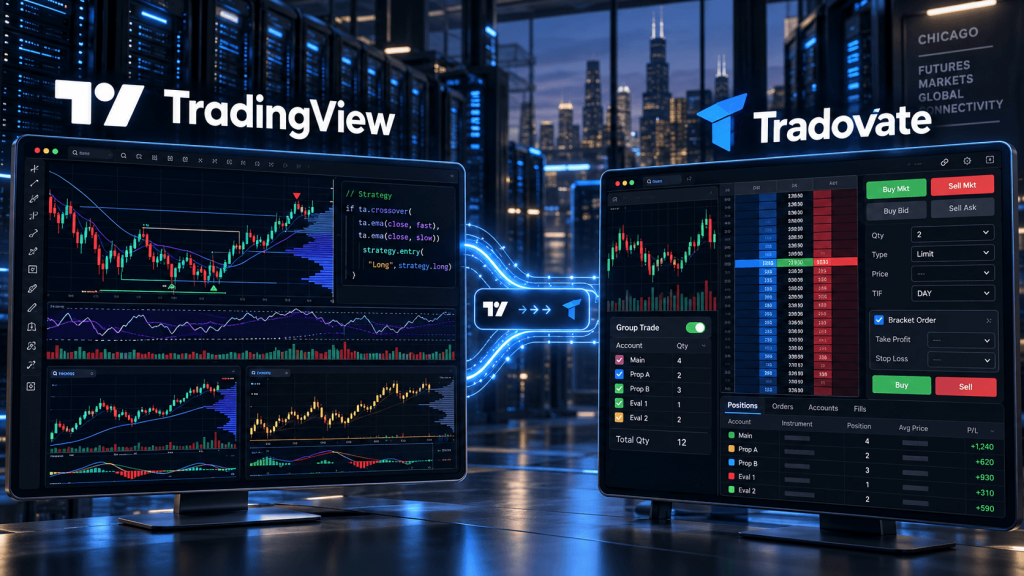
Tradovate officially supports TradingView as an integration partner. A trader can connect a Tradovate account through TradingView’s Trading Panel and place futures orders from TradingView charts. Positions, orders, account information, and notifications can then be viewed through the TradingView broker interface.
That creates a workflow like:
TradingView Supercharts → Tradovate broker connection → futures order
This is attractive for traders who prefer TradingView’s charting but want Tradovate execution.
TradingView chart trading also allows orders to be visually prepared and managed directly on the chart. Traders can select prices, quantities, order types, and brackets visually rather than relying exclusively on a conventional order ticket.
There are still broker-specific limitations.
For the Tradovate connection, TradingView currently notes that stop-loss and take-profit levels can be attached when the parent order is initially placed, but new TP/SL levels cannot simply be added afterward to an already-running position through the same TradingView workflow. Existing attached protective orders can still be modified on the chart.
Real-time futures data also needs to be configured correctly. TradingView currently states that traders using Tradovate for execution need the appropriate real-time market-data entitlement on the broker side; purchasing market data only through TradingView does not by itself make the Tradovate symbol tradable. TradingView supports broker-data verification in some circumstances so eligible users do not necessarily need to pay twice.
The result is a very useful hybrid environment—but one that still follows the broker’s execution rules.
Why Group Trade Changes the Comparison for Prop and Multi-Account Traders
For a trader managing only one futures account, TradingView’s charting advantage may dominate the decision.
For traders managing several accounts, execution architecture becomes more important.
Tradovate’s native Group Trade allows accounts associated with a compatible group setup to receive one grouped order without requiring the trader to submit the same trade repeatedly. Tradovate says traders can define unlimited groups and specify account quantities within those groups.
However, native Group Trade has boundaries. Current Tradovate documentation quoted in its own community states that grouped accounts need to be held with the same brokerage provider. For example, multiple Tradovate Brokerage accounts or compatible accounts from the same prop provider can be grouped, while unrelated accounts across separate providers cannot simply be merged into one native group.
That makes the distinction particularly important for prop traders.
Suppose a trader has:
3 accounts at Firm A
and
2 accounts at Firm B
Tradovate Group Trade may handle the compatible accounts inside one provider group, but it does not automatically create one universal copier spanning unrelated logins and firms.
That requires a different architecture, often involving third-party copying software or alert/webhook-based automation. Any such setup also needs to comply with the rules of each prop firm.
This means “native Group Trade” should not be confused with an unrestricted cross-broker trade copier.
TradingView Alerts and Pine Script vs Tradovate Group Trade
This is one of the most important differences to understand.
TradingView excels at generating signals.
Tradovate Group Trade excels at distributing a manually submitted grouped order across compatible accounts.
These are not the same function.
A Pine Script strategy could detect:
NQ price crosses VWAP
and
RSI above 55
and
time between 8:45 a.m. and 11:00 a.m. CT
Then TradingView could generate an alert.
TradingView alerts can run on price, technical indicators, drawings, and Pine Script conditions across web, desktop, and mobile environments.
But an alert does not automatically activate Tradovate’s native Group Trade.
That is the gap traders sometimes misunderstand.
The native workflow is:
Trader → Tradovate Group Trade → several accounts
A TradingView automation workflow is more like:
Pine Script → TradingView alert → external automation/copy layer → Tradovate account(s)
A third-party service may bridge that gap, but then the system is no longer using only native TradingView + native Tradovate Group Trade.
It has another execution layer that needs to be monitored, secured, and tested.
Which Is Better for Manual Futures Trading?
For manual traders, the answer largely depends on how orders are selected and managed.
TradingView may fit better if most of the workflow happens through:
- multi-timeframe analysis,
- custom indicators,
- Pine Script,
- drawing tools,
- chart-based entries,
- alerts,
- or watching several markets together.
Tradovate may fit better if the workflow depends more on:
- DOM execution,
- grouped accounts,
- futures-specific account management,
- consolidated positions,
- market replay,
- spread trading,
- or native multi-account order entry.
Tradovate itself is not a weak charting platform. Its current charts include trading directly from charts, multiple brackets, custom volume profiling, volume labels, bid/ask information inside candles, and tick, range, volume, minute, hour, and daily chart types.
TradingView simply goes further in the charting and community-indicator ecosystem.
For many traders, this creates a logical split:
TradingView for finding the trade.
Tradovate for managing the trading accounts.
Do TradingView or Tradovate Need a VPS?
Neither platform automatically requires a VPS.
TradingView is largely cloud-based. Alerts continue to operate on TradingView’s infrastructure after they are created; your personal browser does not have to remain open simply for a server-side TradingView alert to function.
Tradovate is also built as a cloud-based multi-device futures platform. A trader can access it through the web, desktop application, or supported mobile devices.
Therefore, a trader manually using TradingView charts connected directly to Tradovate may not gain much simply by putting a browser on a VPS.
A VPS becomes more relevant when the trading stack includes local or third-party automation.
Examples include:
TradingView alert → local webhook receiver → Tradovate API
third-party trade copier → multiple Tradovate accounts
custom Python/Node service → Tradovate execution
browser automation or monitoring processes
NinjaTrader Desktop running alongside Tradovate accounts
In those architectures, the VPS keeps the intermediate software online independently of the trader’s home computer.
For CME-focused futures automation, Chicago is a logical region to evaluate because of the broader Chicago/Aurora futures infrastructure ecosystem. TradingVPS offers Chicago Windows and Linux environments that can host local copier applications, webhook receivers, API services, monitoring, or NinjaTrader-based workflows where a persistent remote machine is genuinely required.
The key principle is:
Do not use a VPS simply because you trade futures. Use one when some part of your execution stack actually needs a machine to remain running.
TradingView vs Tradovate: Which Fits Different Futures Traders?
The strongest choice becomes clearer when the workflow is defined first.
TradingView may fit better if you:
- prioritize advanced charting,
- use several timeframes,
- rely on Pine Script indicators,
- build TradingView strategies,
- use advanced alerts,
- analyze several asset classes,
- or want the same charting environment across desktop and mobile.
Tradovate may fit better if you:
- trade multiple compatible futures accounts,
- need native Group Trade,
- prefer a futures-focused DOM,
- want consolidated account management,
- use market replay or futures spreads,
- or want execution tools closer to the brokerage environment.
Using both may fit better if you:
want TradingView’s analysis environment but prefer Tradovate for execution and account management.
That workflow is already supported through the official integration.
The main limitation to remember is that connecting Tradovate to TradingView does not move every Tradovate-native feature into TradingView.
Group Trade is the clearest example.
Frequently Asked Questions About TradingView vs Tradovate
Yes. Tradovate is an integrated TradingView broker, so eligible users can connect their Tradovate account through TradingView’s Trading Panel and submit futures orders from TradingView charts.
Group Trade lets traders create account groups, assign quantities to accounts, and submit one grouped futures order across compatible accounts.
TradingView has a broader specialized charting ecosystem, including 20+ chart types, multi-chart layouts, Pine Script, alerts, Bar Replay, and a very large community-script library.
Not through Tradovate’s native Group Trade feature directly. Pine Script can generate TradingView alerts, but multi-account automated execution generally requires an additional compatible automation or copier layer.
For CME-focused automation, Chicago is a logical region to evaluate because of the Chicago/Aurora futures infrastructure ecosystem. Actual performance still depends on the broker, API, copier, connectivity provider, and execution path.
Final Thoughts: TradingView for Analysis, Tradovate for Execution Can Be a Strong Combination
TradingView and Tradovate do not need to be treated as mutually exclusive futures platforms.
Their strongest features sit in different parts of the workflow.
TradingView provides an exceptionally deep analysis environment through Supercharts, Pine Script, custom indicators, multi-chart layouts, advanced alerts, Bar Replay, and chart-based order management.
Tradovate provides a futures-focused execution environment with DOM trading, account management, spread tools, market replay, broker integration, and native Group Trade.
That leads to a practical division:
TradingView → analysis and signal generation
Tradovate → futures execution and account management
For a trader with one futures account, TradingView connected directly to Tradovate may provide nearly everything needed in one visual workflow.
For a trader managing several compatible accounts, Tradovate’s native Group Trade can become much more important because one order can be distributed through a configured account group.
For a trader managing accounts across separate brokers, prop firms, or logins, neither TradingView nor native Group Trade alone necessarily solves the entire problem. That is where third-party copiers, APIs, and webhook automation begin to enter the architecture.
And that is also where VPS infrastructure may become relevant.
If the workflow consists only of TradingView’s cloud charts and Tradovate’s cloud platform, a VPS is often unnecessary.
If the workflow includes a locally running copier, execution bridge, API service, NinjaTrader instance, monitoring process, or custom automation, a VPS can provide the always-on environment that those components require.
The comparison therefore is not simply:
advanced charts versus better execution.
It is about designing the workflow correctly.
Use the platform that gives you the strongest analysis tools where you analyze.
Use the platform that gives you the account controls you need where you execute.
And if both are useful, TradingView and Tradovate are already designed to work together.
This article is provided for general technical and educational purposes only and does not constitute financial, investment, legal, or trading advice. Futures trading involves substantial risk. Broker integrations, Group Trade functionality, data requirements, prop-firm rules, platform subscriptions, and third-party automation features can change. Always verify current TradingView and Tradovate documentation and test execution workflows before relying on them for live trading.