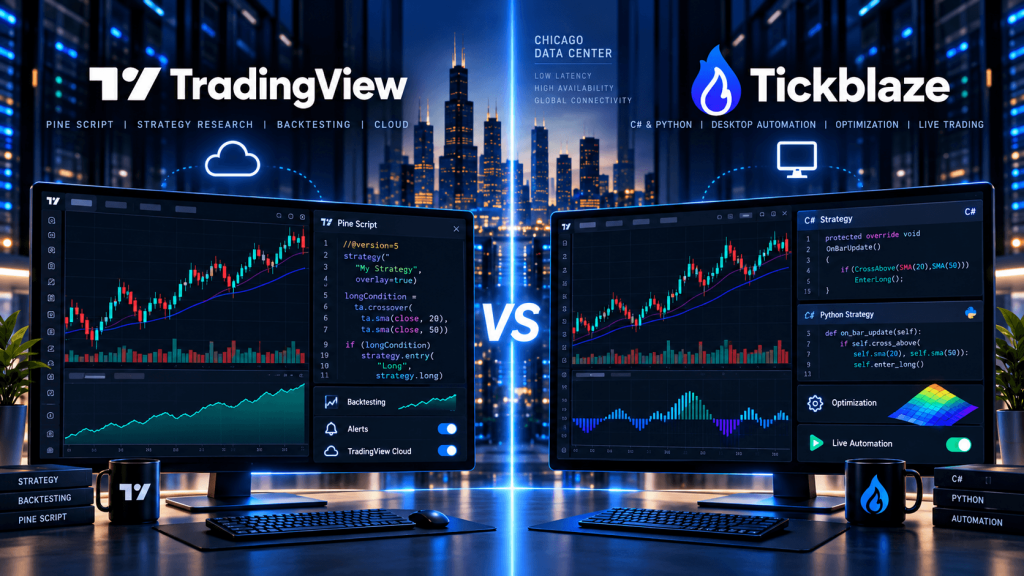
TradingView and Tickblaze both allow traders to develop, backtest, and analyze algorithmic trading strategies, but they approach the process differently. TradingView focuses on accessible cloud-based charting, Pine Script development, historical strategy testing, and server-side alerts. Tickblaze offers a more comprehensive algorithmic trading environment built around C#, Python, tick-by-tick backtesting, portfolio optimization, and broker-connected live strategy execution.
For futures traders in 2026, the biggest difference is what happens after a strategy has been developed.
With TradingView, a trader can write a Pine Script strategy, review its simulated performance, and generate alerts. However, Pine strategies do not natively submit their simulated orders to connected brokerage accounts. Fully automated execution normally requires an external webhook receiver or compatible execution service.
Tickblaze takes a different approach. Its Strategy Desktop is designed to move a trading system through research, backtesting, optimization, simulation, and live execution within the same platform, provided the intended broker connection is supported.
That creates a clear distinction:
TradingView specializes in cloud-based strategy research and signal generation.
Tickblaze specializes in programmable strategy research and integrated trading automation.
The right choice depends on programming experience, backtesting requirements, portfolio complexity, broker compatibility, and whether the strategy needs a continuously running local trading environment.
TradingView vs Tickblaze: Key Differences
TradingView is designed to make advanced charting and custom strategy development accessible without requiring traders to maintain a dedicated Windows workstation. Its Pine Script environment supports indicators, strategies, libraries, alerts, and simulations directly inside Supercharts.
Tickblaze combines discretionary trading tools with a separate Strategy Desktop designed for quantitative research and algorithmic execution. Its broader platform also includes web and mobile interfaces, but the strategy-development and desktop-runtime requirements should be evaluated separately from those interfaces.
The key differences are:
| Feature | TradingView | Tickblaze |
|---|---|---|
| Primary focus | Cloud charting and strategy research | Research and live automation |
| Programming language | Pine Script | C# and Python |
| Strategy backtesting | Yes | Yes |
| Tick-by-tick testing | Intrabar modeling, subject to data availability | Dedicated tick-level backtesting |
| Portfolio backtesting | Limited native portfolio workflow | Integrated multi-strategy portfolios |
| Genetic optimization | No equivalent full native portfolio optimizer | Supported |
| Walk-forward analysis | Requires additional workflow | Supported |
| Monte Carlo analysis | Typically external | Supported |
| Live automated broker execution | Requires external execution layer | Integrated through supported brokers |
| Server-side strategy alerts | Yes | Different platform/runtime architecture |
| Strategy execution environment | TradingView cloud alerts | Tickblaze Strategy Desktop |
| VPS requirement | Mainly for external automation | Relevant for locally hosted live strategies |
TradingView is easier to approach when the trading idea can be expressed as chart conditions and alert signals. Tickblaze becomes more attractive when the strategy needs multiple instruments, advanced optimization, custom risk logic, or broker-connected automated execution.
Pine Script vs C# and Python: Which Is Better for Developing Trading Strategies?
The programming language is one of the most important differences between the platforms.
TradingView Pine Script
Pine Script is a specialized language built for financial chart calculations. Traders can quickly create indicators, visualize signals, define entry and exit rules, and test hypothetical trades without configuring a traditional software development environment.
For example, a futures trader could develop a strategy using:
Price above VWAP + opening-range breakout + moving-average confirmation + trading-session filter
The script can display entries and exits directly on an ES or NQ chart, calculate simulated strategy results, and generate alerts when the defined conditions occur.
Pine Script is especially useful for developing strategies based on technical indicators, price action, timeframes, and clearly defined market conditions. It also benefits from TradingView’s extensive community-script ecosystem.
However, Pine operates within TradingView’s scripting environment. It is not equivalent to having unrestricted access to a general-purpose Python or C# application, operating-system services, external databases, and broker APIs.
Tickblaze C# and Python
Tickblaze supports both C# and Python through its Script Designer. Developers can build trading strategies, custom indicators, multi-symbol strategies, position-sizing logic, risk-management components, and other supported script types.
Python is attractive to traders who already work with statistical analysis, data science, numerical libraries, and machine-learning research. C# is particularly useful for developers building more performance-sensitive trading systems that require structured code and closer integration with the platform’s runtime.
Tickblaze’s documentation indicates that both languages share much of the same platform API, although certain script types are not yet supported through Python. It also identifies C# as the higher-performance option for demanding backtesting, optimization, and trading workloads.
That distinction matters when building more sophisticated systems.
A trader developing a simple moving-average strategy may find Pine Script considerably easier.
A quantitative developer combining multiple futures symbols, portfolio-level position sizing, custom risk management, and advanced strategy optimization may find Tickblaze’s C# and Python environment more suitable.
The practical choice is:
Pine Script for accessible, chart-centered strategy development.
C# and Python for more extensive algorithmic engineering and portfolio automation.
Backtesting and Optimization: Where Tickblaze Goes Further
Both platforms support historical strategy testing, but their testing architectures differ.
TradingView uses a broker emulator to simulate strategy orders against available historical and real-time chart data. Traders can model commissions, slippage, margin assumptions, order timing, and different execution conditions. Features such as Bar Magnifier and deeper historical testing can improve intrabar analysis when the necessary data and subscription capabilities are available.
For many traders, this is sufficient to answer important research questions:
Would the strategy have generated entries under these conditions?
How sensitive are the results to stop distance?
How does performance change across different market regimes?
Does the strategy remain viable after transaction costs?
Tickblaze approaches backtesting as part of a broader quantitative research workflow.
Its Strategy Desktop supports historical testing, playback, parameter optimization, simulation, and live trading. The platform also provides tick-by-tick backtesting, genetic optimization, walk-forward analysis, Monte Carlo analysis, and portfolio-level testing across multiple strategies, instruments, and timeframes.
That broader architecture becomes valuable when a trader moves beyond testing one chart at a time.
For example, a developer might want to run a trend-following strategy across ES, NQ, CL, and GC, optimize parameters using one historical period, validate the results on unseen data, and evaluate the combined drawdown of all four strategies.
Tickblaze is built more directly around that type of workflow.
Its portfolio research tools can also incorporate custom position-sizing, slippage, commission, and risk-management logic. This makes it possible to examine how multiple strategies interact rather than treating every backtest as a completely independent system.
However, more advanced backtesting does not automatically produce better live performance.
Tick-level historical data still cannot perfectly reproduce queue position, unavailable liquidity, unexpected broker rejections, or real market impact. Genetic optimization and repeated parameter searches can also lead to overfitting.
The strongest process on either platform remains:
Define rules → backtest → model realistic costs → optimize cautiously → validate out of sample → forward test → evaluate live execution.
Live Trading Automation: The Biggest Difference
The point where TradingView and Tickblaze separate most clearly is live automated execution.
A TradingView Pine strategy can generate simulated orders and strategy alerts. Those alerts run on TradingView’s servers after creation, meaning the trader’s browser or personal computer does not need to remain open.
But the strategy’s simulated fills are not actual brokerage executions.
A TradingView automation architecture typically looks like:
Pine Script Strategy → TradingView Alert → Webhook → Execution Service → Broker API → Market
The external execution service receives a signal, validates it, translates it into a broker order, and manages the resulting execution state.
This architecture can be effective, but the trader must operate or subscribe to the execution layer separately. That layer needs to handle duplicate alerts, stale signals, rejected orders, account positions, retries, and authentication.
TradingView also warns that webhook delivery can occasionally fail, so production automation should not assume every alert reaches its destination successfully.
Tickblaze has a different architecture.
Its Strategy Desktop provides distinct modes for Backtesting, Optimization, Simulation, and Live Trading. After configuring a supported brokerage connection, traders can run strategy logic against streaming market data and submit live orders through the platform.
A typical Tickblaze workflow looks like:
Market Data → C#/Python Strategy → Risk and Position Sizing → Supported Broker Connection → Market
This reduces the need to build a separate webhook-to-order bridge simply to connect a strategy’s decision logic to the broker.
It does not eliminate execution risk, though.
Orders can still be rejected, connections can fail, and actual account positions can differ from a strategy’s internal expectations. Traders should maintain independent checks for broker connectivity, order acknowledgments, working orders, fills, and position reconciliation.
Tickblaze’s main automation advantage is that the strategy engine itself is designed for live broker-connected execution. TradingView’s advantage is that its signal-generation environment is hosted and easier to operate.
Portfolio Strategies, Risk Management and Broker Connections
Tickblaze becomes particularly interesting when several strategies need to run as one portfolio rather than as unrelated chart systems.
Its Strategy Desktop can host multiple strategies and instruments within one environment. The platform supports specialized scripts for position sizing, trade management, dynamic allocation, risk management, commissions, and slippage modeling.
Consider a portfolio containing:
- an ES intraday strategy,
- an NQ momentum strategy,
- a Gold mean-reversion strategy,
- and a crude-oil breakout strategy.
The trader may want to limit total exposure across the portfolio or avoid opening several highly correlated positions simultaneously.
That requires more than independent buy and sell signals. It requires portfolio-level controls.
TradingView can generate signals for multiple instruments, but coordinating actual broker-account exposure usually requires an external application or execution service.
Tickblaze provides more of that portfolio infrastructure inside its own strategy environment.
Broker compatibility remains an essential consideration. Tickblaze documents connections including Rithmic and Interactive Brokers, alongside several data-provider integrations. With some brokers, additional software may be necessary; for example, an Interactive Brokers connection can depend on TWS or IB Gateway.
Traders should confirm that the specific broker, account type, data subscription, order type, and strategy workflow are supported before selecting Tickblaze for production automation.
The presence of a brokerage logo or data-feed integration does not guarantee that every trading function is supported for every account.
TradingView vs Tickblaze: Does a VPS Matter?
The VPS question depends on where the automation actually runs.
For ordinary TradingView use, a VPS is generally unnecessary. Pine strategy alerts are hosted on TradingView’s infrastructure and can continue operating after the trader closes the browser or shuts down the local computer.
However, if a trader builds a custom execution bridge, the architecture changes:
TradingView Alert → VPS-Hosted Webhook Receiver → Risk Engine → Broker API
In this setup, the VPS hosts the execution service, not the TradingView strategy itself.
The server can run Python, Node.js, a database, logs, broker API connections, and monitoring services. It must also secure its webhook endpoint, authenticate messages, prevent duplicate execution, and recover safely from restarts.
Tickblaze’s desktop automation environment has different requirements.
When its Strategy Desktop runs locally, the machine hosting the application becomes part of the trading system. If that machine shuts down or loses connectivity, the locally hosted strategy cannot continue normal live execution.
A remote machine can therefore be useful, particularly for automated futures strategies.
A potential setup would be:
Trader → Remote Desktop → Compatible Windows VPS → Tickblaze Strategy Desktop → Broker → CME
For CME-focused automation, Chicago is a logical region to evaluate because the futures connectivity ecosystem is concentrated around Chicago and Aurora. Actual latency still depends on the broker gateway, data provider, and network route.
There is, however, an important compatibility issue.
Tickblaze’s current desktop documentation recommends Windows 11 or later, a high-performance CPU, 32 GB RAM, SSD storage, and DirectX-compatible graphics. It does not establish that every Windows Server VPS is officially supported.
Consequently, a trader should verify the operating system, graphical environment, license, and resource requirements before attempting deployment.
For Tickblaze’s recommended desktop environment, 32 GB RAM is a more appropriate planning baseline than assuming a lightweight 4–8 GB VPS will be sufficient. Heavy optimization or multi-strategy workloads may require more CPU and memory.
Tickblaze also describes web/mobile functionality and cloud-oriented platform options, but traders should confirm the current availability of remotely hosted Strategy Desktop execution for their particular subscription rather than assuming all desktop strategies run automatically in the vendor’s cloud.
TradingVPS’s Chicago infrastructure can be evaluated for supporting futures automation and external TradingView execution services. A Tickblaze Desktop deployment should proceed only after the exact Windows environment and software compatibility have been confirmed.
The purpose of a VPS is operational continuity and potentially better connectivity to a relevant gateway—not guaranteed faster fills or profitable trading.
Which Platform Is Better for Different Algo Traders?
TradingView is generally the stronger starting point for traders who want to experiment with systematic trading without maintaining an extensive development environment.
It is especially suitable for:
- Pine Script indicators and strategies,
- discretionary chart-based trading,
- historical strategy evaluation,
- technical signal development,
- cloud-hosted alerts,
- and webhook-driven automation using an external service.
Tickblaze becomes more attractive when the trading system requires a more extensive programming and execution environment.
It is particularly suitable for:
- C# and Python development,
- multi-symbol strategies,
- tick-by-tick historical analysis,
- genetic and walk-forward optimization,
- Monte Carlo research,
- portfolio-level risk management,
- and supported live broker-connected automation.
A hybrid workflow is possible as well.
For example, a trader could prototype a strategy visually in TradingView, then recreate the logic in Tickblaze using C# or Python for deeper research and live deployment.
That translation must be done carefully. Pine Script and Tickblaze may differ in session handling, data construction, indicator calculations, intrabar execution assumptions, and order timing.
A profitable Pine backtest cannot simply be assumed to produce identical results after being rewritten in C# or Python.
Frequently Asked Questions About TradingView vs Tickblaze
Tickblaze offers more integrated functionality for broker-connected live automation, portfolio backtesting, and C#/Python strategy development. TradingView is often easier for Pine Script research, chart-based strategies, and cloud-hosted alerts.
Yes. Tickblaze supports Python scripts for trading strategies and other platform components, although its Python integration does not support every script type available through C#.
Yes. C# is a primary supported scripting language, and Tickblaze identifies it as the higher-performance choice for demanding research, optimization, and trading workloads.
Not directly through native Pine strategy-to-broker automation. Pine strategies simulate orders and can generate alerts, but live automated execution generally requires an external execution service connected to a broker.
Yes. Tickblaze Strategy Desktop includes a Live Trading mode that can operate strategies through supported broker connections.
Final Thoughts: TradingView for Pine Research, Tickblaze for Broader Automation
The biggest difference between TradingView vs Tickblaze for algo trading is not simply Pine Script versus C# and Python.
It is the architecture surrounding the trading strategy.
TradingView gives traders a straightforward way to develop indicators, test trading ideas, visualize signals, and create cloud-hosted alerts. The process is accessible and does not require a permanently running personal computer.
Tickblaze provides a more extensive quantitative trading environment. Its Strategy Desktop supports detailed historical testing, advanced optimization, portfolio analysis, simulation, and live automated execution through compatible broker connections.
That creates two distinct approaches:
TradingView: Strategy → Backtest → Cloud Alert → External Execution
Tickblaze: Strategy → Backtest → Optimize → Simulate → Live Broker Execution
For traders whose main goal is developing technical indicators and producing signals, TradingView is often the simpler choice.
For developers building multi-market systematic strategies, especially those requiring portfolio-level research and direct broker execution, Tickblaze provides a more specialized automation environment.
Infrastructure needs follow the same distinction.
TradingView already hosts its strategy alerts, so a VPS is usually needed only for an external execution component.
A locally running Tickblaze Strategy Desktop may benefit from persistent remote infrastructure, but its documented Windows 11 and hardware recommendations should be checked before deployment on a VPS.
Neither platform eliminates the need for realistic backtesting, out-of-sample validation, simulation, broker-position reconciliation, and risk controls.
The strongest decision is therefore not based solely on which programming language looks more powerful.
It is based on where the strategy must run, how it reaches the broker, how it handles execution failures, and whether the infrastructure can support it reliably.
TradingView is a strong cloud-first strategy research platform. Tickblaze is a more extensive quantitative trading and live automation environment.
The better choice is the one whose complete execution architecture matches the trader’s actual requirements.
This article is for general technical and educational purposes only and does not constitute financial, investment, or trading advice. Algorithmic and futures trading involve substantial risk. Backtested results do not guarantee live performance. Platform functionality, broker integrations, system requirements, and hosting options may change. Always verify compatibility and test automated strategies before live deployment.