
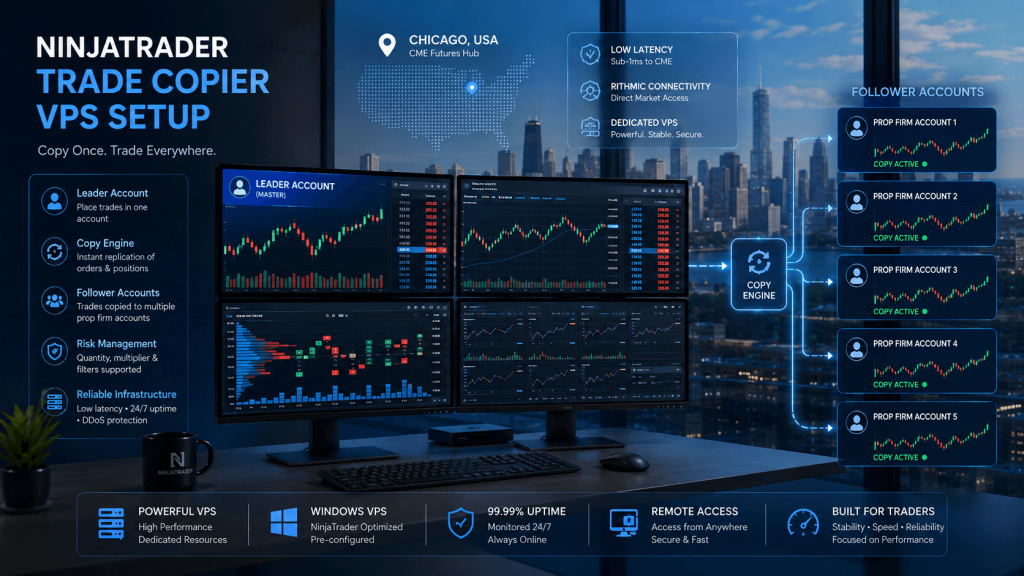
Managing several futures prop firm accounts through NinjaTrader can quickly turn a simple trading workstation into a more demanding technical environment. The trader may have NinjaTrader Desktop running several charts, one or more prop firm connections, a leader account, multiple follower accounts, a trade copier such as Replikanto, R|Trader Pro, custom indicators, DOM windows, and account-monitoring tools all operating at the same time. Once that setup becomes dependent on copying orders between accounts, the reliability of the Windows machine running it becomes part of the overall trading infrastructure.
This is where a NinjaTrader trade copier VPS can be useful. Instead of relying entirely on a desktop or laptop at home, NinjaTrader and the copier can run inside a remote Windows server that remains independent of the trader’s personal computer. The trader connects remotely to manage the environment, but closing the laptop or losing a residential Internet connection does not automatically shut down the remote server.
The purpose of that setup is business continuity and infrastructure stability—not better trading results. A VPS cannot guarantee identical fills across prop accounts, eliminate slippage, prevent broker outages, or ensure that a prop firm permits a particular copy-trading workflow. It can, however, provide a persistent Windows environment for approved NinjaTrader, broker connection, and trade-copying software.
For prop traders, that distinction matters. The prop firm sets the rules governing account ownership, trade copying, automation, location, and technology use. NinjaTrader provides the trading platform. The copier distributes permitted orders. The VPS simply provides the infrastructure on which those applications run.
How a NinjaTrader Trade Copier VPS Setup Works
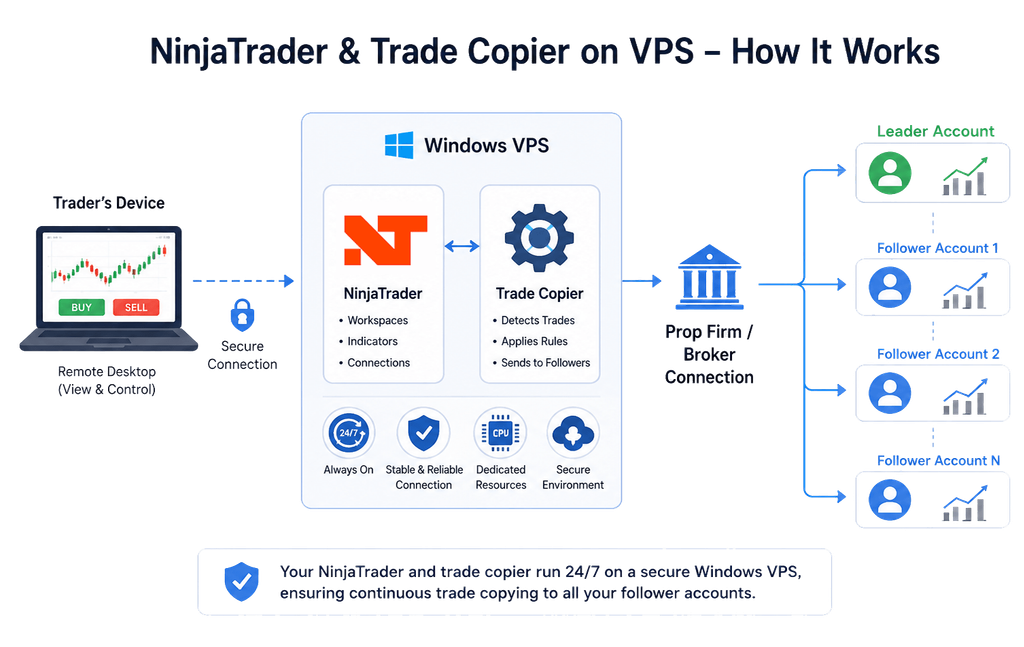
A typical NinjaTrader copier environment begins with one account designated as the leader. Orders placed through that account are detected by the trade copier and reproduced across one or more selected follower accounts according to the copier’s configuration. Depending on the software, followers may use the same quantity as the leader, a fixed ratio, a different multiplier, or another permitted sizing method.
The entire process still depends on several separate components functioning correctly. NinjaTrader must be running. The appropriate broker or prop firm connections must be active. The leader and follower accounts must be visible. The correct futures contract must be loaded. The copier must be open and configured correctly, and the Windows environment hosting everything must remain stable.
With a home-PC configuration, every one of those components also depends on the trader’s local electricity, modem, router, Internet provider, Windows installation, and personal hardware. If the home Internet connection fails, NinjaTrader may lose its connection even though the PC itself remains powered. If Windows restarts unexpectedly or the computer enters sleep mode, the copier may no longer be operating at all.
A VPS changes where the critical applications run. NinjaTrader and the trade copier are installed on a remote Windows server rather than relying exclusively on the trader’s local computer. Remote Desktop becomes a way to view and control that server, but the local machine does not need to host the actual trading application continuously.
The architecture is essentially:
Trader’s device → Windows VPS → NinjaTrader → Prop firm/broker connection → Leader and follower accounts
For a local copier such as Replikanto, the important part of this chain is the environment between NinjaTrader and the connected accounts. If that environment remains online and properly connected, the trader does not need to leave a home desktop operating around the clock simply to keep the copier available.
This is fundamentally different from a cloud copier. A cloud copying service can maintain its own copying engine remotely and may not require NinjaTrader or another desktop application to stay open. A NinjaTrader-based copier is local software, so the machine hosting NinjaTrader remains operationally important.
Why Prop Traders Commonly Put NinjaTrader and the Copier on the Same VPS
Running NinjaTrader and the copier inside one dedicated Windows environment can simplify the setup considerably. The trader does not need to maintain a separate home machine purely for copying, the platform configuration stays in one location, and the same remote environment can hold workspaces, indicators, connection settings, copier configurations, and monitoring tools.
It can also make troubleshooting more straightforward. If follower accounts stop receiving trades, the trader can inspect NinjaTrader, connection status, copier state, resource usage, and logs inside the same server rather than trying to determine whether the problem originated on one of several separate computers.
This does not mean every multi-account architecture should always use one VPS. Some advanced setups deliberately distribute workloads across several servers or use remote copying between machines. For the typical prop trader running one NinjaTrader installation and several permitted follower accounts, however, keeping the main platform and local copier together is usually easier to manage.
Check Your Prop Firm Rules Before Building the Setup
Before installing NinjaTrader or a trade copier on a VPS, confirm that the intended workflow complies with the current rules of every prop firm involved.
This is one of the most important parts of the entire setup because technical capability and prop-firm permission are not the same thing. NinjaTrader may be capable of displaying an account, and a copier may be technically capable of sending orders to it, while the prop firm’s terms prohibit the particular arrangement.
Rules can address account ownership, copy trading, automated trading, cloud servers, VPNs, IP addresses, geographic restrictions, third-party access, and whether copying is allowed between different account stages. Some firms differentiate between evaluation accounts, simulated funded accounts, and live accounts. Others may permit copying only when every account belongs to the same trader and the originating order is manually submitted.
The safest rule is therefore simple: never use a VPS or trade copier to disguise identity, bypass a geographic restriction, access someone else’s account, conceal account ownership, or circumvent technical controls.
A legitimate NinjaTrader VPS setup should make an approved trading workflow easier to operate. It should not alter who is actually responsible for the accounts.
Prop-firm policies also change. A setup that was allowed several months ago should not automatically be assumed compliant today. Before making the server part of a live workflow, review the current rules and obtain clarification directly from the firm when the wording is uncertain.
Trade Copying and Automated Trading Are Not Always Treated the Same
This distinction is especially important.
A trader manually placing an order into a leader account and using approved software to mirror that same order into personally owned follower accounts may be treated differently from a fully automated strategy that independently generates orders based on programmed conditions.
Prop firms can apply separate rules to those two activities.
Using a trade copier therefore does not automatically mean a trader is running an algorithmic strategy, and having software capable of automation does not mean that every type of automation is permitted.
The VPS should be configured around the exact workflow that the prop firm allows rather than around what the software is technically capable of doing.
Choosing the Right VPS for NinjaTrader Trade Copying
A NinjaTrader trade copier VPS needs enough resources for the complete trading environment, not merely enough memory to launch NinjaTrader.
NinjaTrader itself can run on relatively modest hardware, but real-world prop trading setups often include several charts, indicators, account connections, DOM windows, workspaces, R|Trader Pro, browser applications, order-flow tools, and a copier operating simultaneously. The workload can grow considerably as those components are added.
NinjaTrader’s published recommended configuration includes a modern quad-core 64-bit processor, 8 GB of RAM, and SSD storage. That is a useful baseline for the platform, but it should not be interpreted as the ideal specification for every multi-account trade-copying environment.
A practical starting point looks more like this:
| NinjaTrader copier environment | Suggested starting resources |
|---|---|
| Light NinjaTrader setup with a small number of charts | 2 CPU cores / 8 GB RAM |
| Several charts, indicators and multiple accounts | 4 CPU cores / 16 GB RAM |
| NinjaTrader + copier + R | Trader Pro + heavier charts |
| Heavy order flow, custom indicators or multiple platform processes | 6–8 CPU cores / 24–32 GB RAM |
| Large professional multi-platform environment | 8+ CPU cores / 32–64 GB RAM |
These numbers should be treated as starting points rather than guarantees. A poorly optimized workspace can consume more resources than expected, while a clean multi-account setup may require less.
The number of prop accounts is also not the best measure of server size. One NinjaTrader process controlling ten accounts can potentially use fewer resources than three separate NinjaTrader processes operating numerous charts and custom indicators.
CPU performance matters because NinjaTrader performs many time-sensitive platform operations while processing incoming market data, indicators, charts, and orders. Memory matters because every additional workspace, chart, indicator, and supporting application consumes RAM. Fast storage helps with platform files, databases, historical data, logs, and general Windows responsiveness.
A good VPS configuration should leave resource headroom rather than operating close to maximum CPU or memory usage throughout the trading session.
Why Chicago Is Commonly Chosen for Futures VPS Hosting
For U.S. futures workflows, Chicago is a common VPS location because significant futures market, broker, and data infrastructure is located in the region. The practical objective is to place NinjaTrader on a server with a stable network route to the broker or data infrastructure being used.
Server location should not be presented as a guarantee of a particular fill or execution result. Physical proximity is only one component of latency. Routing, broker architecture, data provider infrastructure, network congestion, and the destination server all affect the actual connection.
A Chicago server can nevertheless be a logical choice for many Rithmic, CQG, NinjaTrader, and futures-focused workflows.
This is why TradingVPS offers Chicago-based Windows environments specifically for futures trading applications. Traders can run NinjaTrader, supported copier software, R|Trader Pro, and related tools remotely while selecting CPU and RAM based on the complexity of their setup.
The practical advantage is not a promise of “zero latency.” It is having the trading platform hosted in an environment designed around futures workloads rather than relying entirely on a household PC and residential connection.
Setting Up NinjaTrader and the Trade Copier on a VPS
The cleanest setup begins with the Windows environment itself. Before installing trading applications, make sure the VPS has sufficient available storage, Windows is updated, remote access is working correctly, and login credentials are secure. Avoid filling the server with unrelated applications. A dedicated trading environment is easier to troubleshoot when only the software required for the trading workflow is installed.
Install NinjaTrader Desktop normally and confirm that it opens correctly before adding any copier software. The platform should be allowed through the Windows firewall when required, and its connection to the broker or prop firm should be tested independently before the copier is introduced.
This sequencing matters. If NinjaTrader cannot maintain a stable connection by itself, installing a trade copier will not fix the underlying problem.
Once NinjaTrader is operating correctly, configure the prop firm connection using the credentials and connection information supplied by the firm. Depending on the account provider, that may involve Rithmic, Tradovate, CQG, or another supported connection.
After connecting, confirm that the expected accounts appear in NinjaTrader and that account balances, positions, and relevant market data are displaying normally.
Only then should the copier be installed and configured.
With Replikanto, for example, the copier reads accounts that are already connected through NinjaTrader. The accounts are not independently connected directly to Replikanto. This means that when an expected follower is missing from the copier, the first question should often be whether the account is correctly connected and visible inside NinjaTrader itself.
The leader account should then be selected carefully, followed by the permitted follower accounts. Quantity relationships, contract selection, and any relevant copier settings should be checked before a live workflow is used.
A common configuration mistake is assuming that because an account appears in the platform, every necessary copier setting is correct. The leader may be wrong, the follower may not be armed, the contract may not match, NinjaTrader may be in a simulation mode that prevents the expected behavior, or another copier window may already be active.
The safest approach is to build the setup slowly and verify each layer before adding another.
Be Careful With Multiple Rithmic Connections
Rithmic-based prop accounts require particular attention.
Multiple accounts under the same applicable Rithmic connection may be available together, but separate Rithmic broker connections can be subject to simultaneous-connection restrictions. NinjaTrader’s current prop-firm guidance specifically notes limitations when switching between distinct Rithmic-based connections, and this can affect traders attempting to combine accounts from several firms inside one installation.
Do not assume that adding another connection configuration means both connections can operate simultaneously.
This is an architectural limitation rather than a problem that can be solved by buying a larger VPS. Increasing the server from four cores to eight cores does nothing when the restriction comes from the connection model itself.
If the intended prop account structure requires several different Rithmic logins, investigate the supported architecture before building the complete copier setup. Depending on the firms, credentials, and software involved, the correct solution may require a different connection arrangement, separate platform environments, or another copier architecture entirely.
The goal should always be a supported and compliant configuration, not a workaround designed to circumvent connection or account controls.
Configure Leader, Followers and Order Behavior Carefully
Once the accounts are visible, the copier needs to understand exactly which account controls the workflow.
The leader is normally the account where the trader originates the permitted order. Followers receive replicated instructions according to the copier configuration. Before the session begins, verify the leader account deliberately rather than relying on whatever account happens to have been selected during the previous session.
Follower selection should receive the same attention. A multi-account copier can magnify a configuration mistake immediately. If an unintended follower remains enabled, an order may be copied to an account the trader did not intend to trade. If an intended follower is disabled, the leader may enter a position while that account remains flat.
Multiple copier windows or tabs can create additional confusion. A trader may disable a follower in one window without realizing another active copier configuration is still using the same leader and account. A clean workspace with a clearly defined copier layout is therefore preferable to opening several experimental configurations and leaving them active.
Contract selection is another detail that should be verified during futures rollover periods. The leader and follower environment needs to reference the intended active contract. A mismatch between futures expirations can cause copying behavior that appears to be a server or connection problem when the real issue is simply the instrument configuration.
Order-management behavior deserves particular attention. Entries, stop orders, targets, ATM strategies, OCO logic, and market-only copying can behave differently depending on the copier settings. A trader should understand whether follower protective orders are copied directly from the leader, generated independently through an ATM configuration, or handled another way.
Do not discover those differences for the first time during an active position.
Test the intended workflow in a permitted non-live or controlled environment first. Confirm what happens when an entry is placed, modified, partially filled, canceled, and exited. Check what happens if a follower rejects an order. Verify what happens if the copier becomes temporarily disconnected and later reconnects.
The objective is not simply to confirm that one test order appears on several accounts. It is to understand the complete behavior of the system when normal and abnormal events occur.
Monitoring and Preventing Out-of-Sync Prop Accounts
One of the biggest misconceptions about running a trade copier on a VPS is that server uptime automatically means the accounts are synchronized.
It does not.
The VPS may remain online while NinjaTrader loses its broker connection. NinjaTrader may remain open while one follower becomes unavailable. The copier itself may still be visible while an order is rejected on a particular account.
Local trade copier reliability therefore requires monitoring at multiple levels.
The server needs to remain available, but NinjaTrader also needs to remain responsive. Broker connections need to be active. Leader and follower accounts need to remain visible, and the copier should remain in its intended operating state. CPU, memory, and storage should also be monitored because a heavily overloaded Windows environment can create application instability even when the network connection itself is healthy.
Broker disconnections deserve particular attention. When NinjaTrader loses the relevant broker connection, a copier such as Replikanto cannot simply manufacture connectivity on its own. Copying can pause while affected accounts are unavailable.
When connectivity returns, missed trades may not automatically be recreated.
That creates the possibility of the leader and follower accounts being out of sync. Imagine that the leader entered and exited a position while one follower was disconnected. When the follower reconnects, simply resuming new copying does not necessarily reconstruct everything that occurred while it was offline.
The trader should therefore verify positions after any significant disconnect rather than assuming that reconnecting means every account has automatically returned to the same state.
This is one of the strongest arguments for using monitoring rather than focusing exclusively on headline VPS uptime.
A high-availability server is valuable because it reduces one category of interruption. Good monitoring tells the trader whether the applications and connections running inside that server are actually functioning.
Windows Updates, Restarts and Remote Desktop Behavior
A NinjaTrader VPS needs to operate reliably without somebody watching it continuously, which makes Windows maintenance part of the setup.
Security updates should not simply be disabled forever. Doing so can create a different operational and security risk. The better approach is controlled maintenance: schedule updates at an appropriate time, restart deliberately when necessary, and verify the complete trading environment afterward.
That verification should include more than confirming that Windows came back online.
Open NinjaTrader and confirm the expected workspace. Check broker connections. Verify that the correct accounts appear. Confirm the copier is running and that the intended leader and followers are selected. Check whether any application requires manual authentication after the restart.
A server that successfully restarts but leaves the copier closed is not fully recovered.
Remote Desktop behavior should also be tested. Disconnecting from a remote session normally does not mean shutting down the Windows server, but traders should understand the difference between disconnecting, signing out, restarting, and shutting down. Closing a personal laptop should not affect a properly running VPS environment, while logging out of a Windows session or closing applications intentionally may.
The safest approach is to test the exact remote-access procedure before relying on the server during an active trading session.
Security and Business Continuity for Prop Trading VPS Accounts
A remote Windows server should be treated as part of the trader’s financial infrastructure.
Use strong unique credentials and do not share VPS access with other traders. Keep Windows and required applications current, restrict unnecessary software, and avoid installing random plugins or utilities simply because they promise performance improvements.
Account credentials should remain controlled by the account owner, particularly in the prop-firm environment where third-party account access can violate firm rules.
The same principle applies to VPNs and location-masking tools. A VPS has a legitimate infrastructure purpose, but it should never be configured specifically to create a false impression about who is accessing an account or where they are located.
Business continuity should also include a way to reach the trading environment when the trader’s primary home Internet connection is unavailable. A mobile connection or another independent Internet path can allow the trader to access the VPS, check NinjaTrader, inspect follower status, and take whatever permitted corrective action is necessary.
The VPS and backup Internet solve different problems. The VPS keeps the trading application separate from the home network. The backup connection gives the trader another route to the VPS when the home ISP fails.
For a serious multi-account setup, both can be useful.
How TradingVPS Fits Into a NinjaTrader Trade Copier Setup
A local NinjaTrader copier creates a straightforward infrastructure requirement: Windows, NinjaTrader, the copier, and the broker connections all need a stable environment in which to operate.
TradingVPS can provide that remote environment without pretending to control the parts of the workflow that remain outside the server.
A Chicago TradingVPS configuration can host NinjaTrader Desktop, Replikanto or other supported Windows applications, R|Trader Pro, charts, indicators, and monitoring tools. CPU and RAM can be selected according to how heavy the actual workspace is rather than according to an arbitrary number of prop accounts.
This is particularly useful for traders who do not want a permitted copier workflow tied to whether a home desktop remains switched on throughout the futures session. The local computer becomes a management device rather than the primary host for the copier.
TradingVPS also provides an upgrade path as the workload grows. A trader may begin with one NinjaTrader instance and several simple charts, then later add heavier indicators, order-flow tools, additional applications, or more complex workspaces. Being able to increase server resources can be simpler than rebuilding the entire environment on another physical computer.
The VPS should still be monitored, and the prop firm’s rules remain the trader’s responsibility. A faster CPU cannot fix an unsupported account configuration, and a reliable server cannot prevent an external broker outage or rejected order.
The purpose of the infrastructure is narrower and more credible: provide a persistent, remotely accessible Windows environment for the trading software the trader is permitted to use.
Frequently Asked Questions About NinjaTrader Trade Copier VPS Setups
Yes, provided the Windows VPS meets NinjaTrader’s requirements and the software is installed and configured correctly. Replikanto operates through NinjaTrader, so NinjaTrader and the relevant account connections need to remain active for local copying to function.
A light setup may work comfortably with around 8 GB of RAM, while multi-account environments with numerous charts, indicators, R|Trader Pro, order-flow tools, or multiple applications may benefit from 16 GB, 24 GB, 32 GB, or more. Actual Windows resource usage should guide the decision.
Technically, NinjaTrader and compatible copier software can work with multiple visible accounts, but the exact configuration depends on the broker or data connection and the prop firm’s current rules. Rithmic-based connections in particular can have connection-level limitations that should be checked before combining several firms.
The software may technically support accounts from different firms in some configurations, but technical support does not mean the arrangement is permitted. Each prop firm’s current policy on account ownership, copy trading, automation, cloud servers, and cross-firm activity should be checked independently.
Chicago is a logical location for many U.S. futures workflows because important futures connectivity is located in the region. However, the best location depends on the actual network route to the trader’s broker, data provider, or other infrastructure. No server location guarantees a particular execution result.
A properly configured VPS continues running independently of the trader’s local computer. Once NinjaTrader and the copier are operating on the remote server, turning off the home device does not normally shut down the VPS.
Final Thoughts on Building a NinjaTrader Trade Copier VPS
A reliable NinjaTrader trade copier VPS setup for prop firm accounts is not simply a matter of installing NinjaTrader on a remote Windows machine and selecting several followers.
The complete environment needs to be designed around the accounts, connection architecture, copier behavior, Windows resources, monitoring requirements, and prop-firm rules that apply to the trader.
Start with compliance. Confirm that the intended accounts and copying method are permitted. Then configure NinjaTrader and establish stable account connections before introducing the copier. Select the leader and followers carefully, understand how quantities and protective orders are handled, and test the setup before depending on it during an active session.
Pay particular attention to Rithmic connection architecture when accounts from multiple firms are involved. Some connection limitations cannot be solved with additional server resources and need to be addressed at the account and platform-design level.
Once the copier is operating, monitor more than server uptime. A healthy VPS does not automatically mean NinjaTrader is connected or that every follower account remains synchronized. Broker status, follower availability, resource consumption, rejected orders, and post-disconnection reconciliation are all part of reliable multi-account operation.
For desktop-based trade copiers, a Windows VPS can remove several avoidable local dependencies. TradingVPS provides a futures-focused remote environment where NinjaTrader and supported copier applications can remain hosted without depending on a trader’s home computer, residential Internet, or local electricity.
That is the correct role of the VPS in prop-firm copy trading.
It does not determine which trades to take. It does not change the prop firm’s rules. It does not guarantee matching executions across accounts.
It provides the infrastructure needed to keep a permitted NinjaTrader trade-copying environment available, manageable, and independent of the trader’s personal PC.