Choosing a futures trading platform involves more than comparing charts, commissions, and trading indicators. The infrastructure behind each platform can influence how orders are routed, which exchanges are accessible, how advanced orders are managed, and whether automated strategies can operate reliably.
Two important names in this market are CQG and Tradovate.
CQG is a professional market-data, trading technology, and order-routing provider serving individual traders, futures commission merchants (FCMs), proprietary trading firms, and institutional participants. Its technology includes exchange gateways, trading applications, market-data services, advanced order management, and APIs.
Tradovate approaches the market differently. It combines futures brokerage services with an integrated, cloud-based trading platform designed for active individual traders. Users can trade through a browser, desktop application, or mobile device, with access to DOM trading, charts, server-side brackets, market replay, and supported third-party integrations.
That creates a useful distinction:
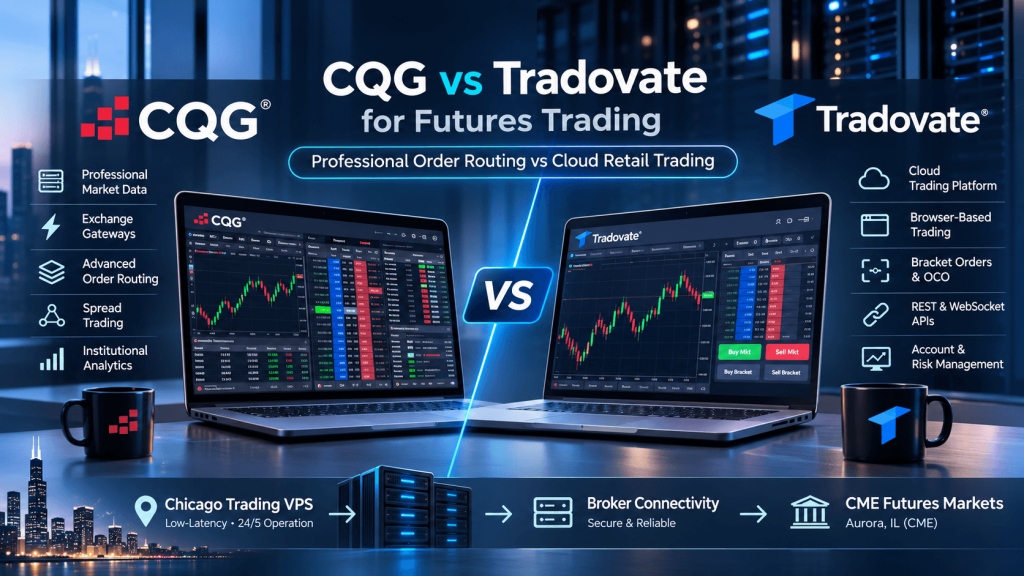
CQG emphasizes professional market connectivity, advanced analytics, and order-routing infrastructure.
Tradovate emphasizes accessible futures brokerage, cloud-based trading, and streamlined retail execution.
However, this is not a simple comparison of desktop software versus cloud software. CQG also provides browser-based trading through CQG Desktop and CQG One, while Tradovate supports advanced server-side order management.
For CME futures traders in 2026, the better choice depends on the instruments being traded, broker relationships, required order types, automation needs, total trading costs, and whether a locally running platform would benefit from a VPS.
CQG vs Tradovate: Key Differences at a Glance
The first distinction is the business model.
CQG primarily provides trading technology, market data, and routing services that traders access through participating brokers or institutional arrangements. Tradovate is a futures brokerage brand with its own integrated trading software.
Consequently, comparing CQG with Tradovate is not exactly the same as comparing two standalone trading applications.
| Feature | CQG | Tradovate |
|---|---|---|
| Main role | Market data, trading technology and order routing | Futures brokerage and trading platform |
| Primary audience | Professional, institutional and active futures traders | Active individual futures and prop-firm traders |
| Trading applications | CQG Desktop, CQG One, QTrader, Integrated Client | Tradovate Web, Desktop and Mobile |
| Browser-based trading | Yes, through supported CQG products | Yes |
| Advanced order routing | Extensive gateway and smart-order infrastructure | Integrated futures order management |
| CME futures support | Yes, through participating brokers | Yes |
| Global exchange access | Broad international coverage, subject to permissions | More concentrated on supported U.S. futures markets |
| Advanced spread execution | Specialized CQG Spreader capabilities | Spread Matrix and supported spread trading |
| Market data and analytics | Extensive professional offerings | Integrated retail-focused tools |
| API capabilities | Client and enterprise API offerings | REST and WebSocket APIs |
| Multi-account features | Available across eligible accounts and products | Native Group Trade |
| Pricing model | Depends on CQG product, broker and services | Published brokerage commission plans |
| VPS relevance | Higher for supported local software and custom automation | Lower for ordinary cloud trading; useful for external automation |
Both platforms provide legitimate futures trading capabilities. The differences become clearer when examining what each trader needs from the order-routing and software architecture.
Professional Order Routing: Where CQG Stands Out
CQG’s professional reputation is closely connected to its market-data network and exchange connectivity.
Its infrastructure includes Hosted Exchange Gateways that provide direct market access to more than 45 exchanges through distributed, exchange-adjacent systems. This allows eligible traders and connected brokers to access futures markets across North America, Europe, Asia, and other regions.
For a trader executing only MES or MNQ, such global connectivity may be unnecessary.
For a professional trader managing energy futures, agricultural spreads, European index futures, and U.S. interest-rate contracts, broader market access can become a significant advantage.
CQG also supports specialized server-side execution technology.
For example, CQG Spreader is designed to manage multi-leg spread strategies through execution logic hosted near relevant exchange infrastructure. Rather than requiring a trading workstation to continuously manage each leg across a long-distance connection, supported spread-management decisions occur within CQG’s server-side systems.
This can be valuable for traders managing calendar spreads, intermarket spreads, and more complex strategies where the timing and coordination of individual legs matter.
Other professional CQG capabilities include sophisticated order types, DOM-based trading, market aggregation, algorithmic order management, and multi-account workflows.
These features are not necessarily included in every CQG application or subscription. A trader using the basic browser-based CQG Desktop product should not assume they automatically receive every Integrated Client or Spreader capability.
The distinction between CQG’s network infrastructure and the specific CQG product being purchased is therefore essential.
How Tradovate Handles Futures Orders
Tradovate uses a cloud-based architecture designed to make futures order management accessible across devices.
Its platform supports market, limit, stop, OCO, and other eligible order-management functions. Traders can configure bracket orders, trailing stops, and multiple target-and-stop levels.
Importantly, Tradovate states that its supported orders are held at the exchange or on its servers rather than exclusively on the trader’s device.
This means a supported server-managed stop or bracket can continue operating after the trader closes a browser or loses their local Internet connection.
That does not mean every possible trading strategy is hosted by Tradovate. A custom algorithm running on a personal computer still depends on the environment in which the algorithm executes.
But for ordinary discretionary trading and native server-managed orders, Tradovate’s architecture reduces dependence on a continuously running desktop interface.
The key difference is that CQG offers deeper specialized routing infrastructure, while Tradovate packages capable futures order management into a more straightforward brokerage experience.
Neither architecture guarantees superior fills in every market condition. Actual execution depends on market liquidity, order type, queue position, brokerage controls, connectivity, and other factors.
Trading Platforms, DOM Tools and Market Analysis
Both CQG and Tradovate provide professional-looking trading interfaces, but their product structures differ considerably.
CQG offers several applications aimed at different levels of trading complexity.
CQG Desktop is a browser-based platform offering market data, charting, quotes, orders, and position management. It is designed to provide a more accessible entry into CQG’s trading environment.
CQG One builds on that interface with additional professional capabilities, including advanced analytics, detailed market-by-order functionality, smart orders, and supported algorithmic tools.
CQG QTrader provides a Windows desktop environment with charts, technical studies, order-routing tools, and functionality such as Spreadsheet Trader.
CQG Integrated Client is the flagship professional application. It includes extensive charting, market analytics, trading interfaces, historical research tools, and support for advanced workflows such as AutoTrader and CQG Spreader, where appropriately enabled.
This product range is a strength, but it also introduces complexity. Traders need to identify the correct application and service package rather than treating every CQG-branded interface as equivalent.
Tradovate has a more unified platform offering.
Its trading environment includes a DOM ladder, order entry, customizable charts, volume-based chart features, TPO profiles, quotes, market replay, account-performance reporting, and native Group Trade functionality.
Traders can access their environment through browsers, desktop applications, and mobile devices without buying a separate Tradovate platform license.
Tradovate also supports selected third-party tools and integrates with TradingView for supported trading workflows.
For a discretionary ES or NQ trader, this can provide most of the necessary functionality without requiring an expensive professional market-data terminal.
CQG becomes more attractive when the trader needs specialized analytics, professional order-routing features, advanced spread management, or access to a broader set of international markets.
The practical question is not which interface displays more information.
It is which tools are genuinely necessary for the trader’s strategy and market coverage.
Algo Trading, APIs and Multi-Account Execution
Automation introduces another layer to the CQG vs Tradovate comparison.
CQG supports algorithmic trading through multiple technologies, but API access differs between its product families.
Its Client APIs are associated with CQG Integrated Client and require the application and client API to operate on the same machine. They can support custom market-data, charting, analytical, and trading integrations, subject to the appropriate subscriptions.
CQG also offers enterprise technologies such as Web API, FIX connectivity, and other institutional integration options. These are designed for different customer requirements and should not be confused with unrestricted API access for any individual CQG Desktop subscriber.
For professional developers, this range of connectivity options can be useful when building custom trading applications, risk systems, analytics tools, or multi-account execution workflows.
Tradovate provides REST and WebSocket APIs for supported trading functions, including placing orders, managing orders, retrieving account information, and monitoring positions.
However, access is not automatically included with every trading login.
Its documented individual API requirements include a live account with more than $1,000 in equity, an active API Access subscription, and a generated API key. Standard individual API access is not available to ordinary prop-firm evaluation accounts, and direct API market-data permissions have separate requirements.
That makes Tradovate suitable for certain independently developed futures bots, but it requires additional planning beyond simply opening the web platform.
Multi-Account Trading
Tradovate offers native Group Trade, enabling traders to create compatible account groups and assign quantities to individual accounts.
A trader with several eligible accounts can submit one group order rather than manually entering the same trade repeatedly.
However, Group Trade is limited by brokerage-provider compatibility, and it has important limitations around certain ATM strategy workflows. It should not be confused with a universal parent-and-child trade copier that continuously synchronizes every order operation across unrelated brokers.
CQG can support multi-account trading and management through appropriate professional products and broker permissions. CQG’s client API also describes trading across multiple accounts and brokers.
Neither system automatically removes prop-firm restrictions, account-specific position limits, or the need to reconcile actual fills.
For automated futures traders, the choice is therefore tied to the execution design.
Tradovate may be simpler for a focused CME strategy using its supported brokerage API. CQG may be more suitable for professional multi-broker, multi-market, or specialized routing requirements.
CQG vs Tradovate Pricing: The Total Cost Matters
The pricing structures are quite different.
Tradovate offers publicly listed brokerage plans with commission rates that depend on the selected membership.
As of October 2026, its advertised plans include:
| Tradovate plan | Membership price | Micro futures commission, per side | Standard futures commission, per side |
|---|---|---|---|
| Free | $0/month | $0.39 | $1.29 |
| Monthly | $99/month | $0.29 | $0.99 |
| Lifetime | $1,499 one-time | $0.09 | $0.59 |
These are advertised commission components for eligible contracts, not complete all-in trading costs. Exchange, NFA, and clearing charges still apply, and certain products have different rates.
CQG pricing is more product-specific.
Published CQG service pricing lists CQG Desktop at a $25 monthly base package, while CQG QTrader and CQG One each have a $100 monthly base package. CQG Integrated Client has a substantially higher published base price, with additional charges for trading or specialized functionality.
Some CQG products also have transaction-based charges and caps, while broker-specific agreements can affect the final amount.
For example, the published CQG Desktop schedule includes a $0.25-per-fill transaction charge, subject to its stated cap and service terms.
The correct cost comparison is therefore not simply Tradovate’s monthly membership versus CQG’s software subscription.
A trader should calculate:
Total cost = platform fees + broker commissions + exchange fees + regulatory fees + market-data fees + applicable routing or technology charges.
For a low-volume retail trader who only needs CME micro futures, Tradovate’s entry-level pricing may be easier to understand.
For a professional trading operation, CQG’s additional costs may be justified by specialized data, connectivity, execution, and analysis requirements.
But paying more for routing technology does not guarantee that an individual trading strategy will earn more or receive better fills.
Does a Chicago VPS Matter for CQG or Tradovate?
The VPS question depends on which CQG or Tradovate component is running locally.
This distinction is particularly important because both companies offer cloud-based capabilities.
Tradovate Web and CQG Desktop do not inherently need a separate VPS for ordinary browser trading. Both platforms rely on hosted infrastructure for important aspects of their service.
Installing a browser on a Chicago VPS does not automatically improve the complete execution path.
A VPS becomes more relevant when the trading workflow includes software that must remain running on the user’s machine.
For example, a custom Tradovate API bot may need a persistent runtime to process market signals, communicate with the brokerage API, manage authentication, and reconcile account positions.
That bot can be hosted on a suitable Windows or Linux VPS, depending on its dependencies.
For CQG, a trader using Integrated Client with its client APIs may need a continuously running Windows environment. Because CQG specifies that those APIs operate on the same machine as Integrated Client, the placement of the application and API process becomes an important architectural consideration.
However, there is a compatibility caveat.
CQG’s current specifications recommend 64-bit Windows 11 and at least 12 GB RAM for Integrated Client, rather than explicitly certifying every Windows Server VPS environment. Anyone considering a TradingVPS Windows Server deployment should first confirm the selected CQG application’s licensing and operating-system compatibility.
If officially supported or validated in the intended environment, a persistent remote machine can reduce dependence on residential power and Internet connectivity.
Why Chicago Is Relevant for CME Futures
CME’s electronic futures infrastructure is concentrated in Aurora, Illinois, near Chicago. CQG also maintains relevant infrastructure within the Chicago/Aurora ecosystem.
That makes Chicago a sensible region to benchmark for automated CME strategies.
A potential workflow might be:
Trader’s Computer → Remote Desktop → Chicago VPS → Local Trading Strategy → Broker or CQG Gateway → CME
For Tradovate API automation, the equivalent setup might run a Python or C# application on the VPS rather than a complete desktop terminal.
However, CQG operates distributed gateways, and Tradovate has its own brokerage network architecture. The correct server location depends on the actual endpoint used by the trading application.
A Chicago VPS is not equivalent to direct CME colocation.
It also does not guarantee lower end-to-end latency, uninterrupted access, or favorable order fills.
TradingVPS provides Chicago-based server infrastructure that can be evaluated for custom futures automation, supported Windows trading software, and other workloads requiring continuous remote operation.
For a lightweight execution bot, two fast cores and 8 GB RAM can be a practical starting point. For more substantial Windows desktop analytics, multiple market-data streams, or CQG Integrated Client, additional memory and processor capacity may be necessary.
More important than any advertised server specification is testing the actual application with its broker connection, checking resource consumption, and monitoring whether orders and positions remain synchronized.
Who Should Choose CQG vs Tradovate?
For traders deciding between these platforms, the strongest approach is to match the software and connectivity to the real trading workflow.
Choose CQG when the trading operation requires professional market data, access to exchanges in multiple regions, advanced analytics, specialized spread execution, institutional-style connectivity, or more complex routing and account-management tools.
A trader managing international futures spreads or building sophisticated execution applications may benefit from CQG’s broader technology infrastructure.
Choose Tradovate when the priority is a streamlined futures brokerage experience, convenient cloud access, straightforward DOM trading, transparent retail commission plans, and simple multi-device account management.
A trader focused on MES, MNQ, ES, or NQ who needs practical charting, market replay, and bracket-order functionality may find Tradovate more accessible.
For API developers, the decision requires an additional check: the specific entitlements, subscriptions, market-data permissions, and supported execution workflow.
For professional traders, CQG’s wider capabilities may make sense.
For retail futures traders, Tradovate’s integrated brokerage model can reduce the number of separate systems needed to start trading.
Neither is universally better. A low-latency spread strategy, a discretionary micro-futures strategy, and a custom multi-account execution system have different priorities.
Frequently Asked Questions About CQG vs Tradovate
Yes. CQG Desktop and CQG One provide web-based trading capabilities. CQG also offers locally installed professional applications such as QTrader and Integrated Client.
Yes. Tradovate supports DOM trading, OCO brackets, trailing stops, and multiple server-managed stop and target levels. It should not be characterized as a platform limited to simple market orders.
Yes. CQG supports algorithmic and automated trading through applicable products, Client APIs, enterprise integrations, and specialized systems such as CQG Spreader. Availability depends on the selected services and permissions.
Yes. Tradovate offers REST and WebSocket APIs for eligible customers, subject to live-account, subscription, authentication, and market-data requirements.
Not for its browser-based products. A VPS may be useful for supported locally running applications or custom automation, but operating-system compatibility must be verified before deployment.
Not for standard web-based trading and supported server-managed orders. A VPS can become useful when the trader operates an external API bot or another locally running automation service.
Final Thoughts: CQG for Professional Infrastructure, Tradovate for Accessible Futures Trading
The most important difference between CQG vs Tradovate is the role each plays in the futures trading ecosystem.
CQG is a broad technology provider combining market data, exchange connectivity, sophisticated routing, professional trading applications, and specialized execution systems.
Tradovate is an integrated futures brokerage and cloud trading platform that brings charting, DOM execution, market replay, order management, and multi-device access into a more unified retail experience.
Both provide cloud-based tools.
Both support advanced futures orders.
Both can play a role in automated trading.
But their strongest use cases differ.
CQG is a strong choice when routing sophistication, multi-exchange connectivity, and professional execution workflows are central to the strategy.
Tradovate is a strong choice when simplicity, convenient account access, and integrated futures brokerage are the primary requirements.
For CME-focused automated strategies, hosting infrastructure adds another consideration. A compatible Chicago VPS can provide a persistent runtime for supported desktop software or external trading bots without requiring a personal computer to remain online.
That infrastructure should be chosen only after confirming the platform’s actual software requirements, API architecture, and broker connectivity.
Ultimately, the right decision begins with the trading workflow—not the marketing labels attached to either platform.
A trader needs to know what markets the account can access, where orders are managed, what software must stay running, how much the complete setup costs, and which system is responsible when an order or connection fails.
Answer those questions first, and the choice between CQG and Tradovate becomes considerably clearer.
This article is provided for technical and educational purposes only and is not financial or investment advice. Futures trading involves leverage and significant risk. Platform features, account permissions, pricing, exchange connectivity, and software requirements can change. Always verify the latest conditions directly with the appropriate provider and test trading configurations before live use.