A practical guide to when futures markets trade, when liquidity tends to concentrate, and how to keep trading infrastructure prepared.
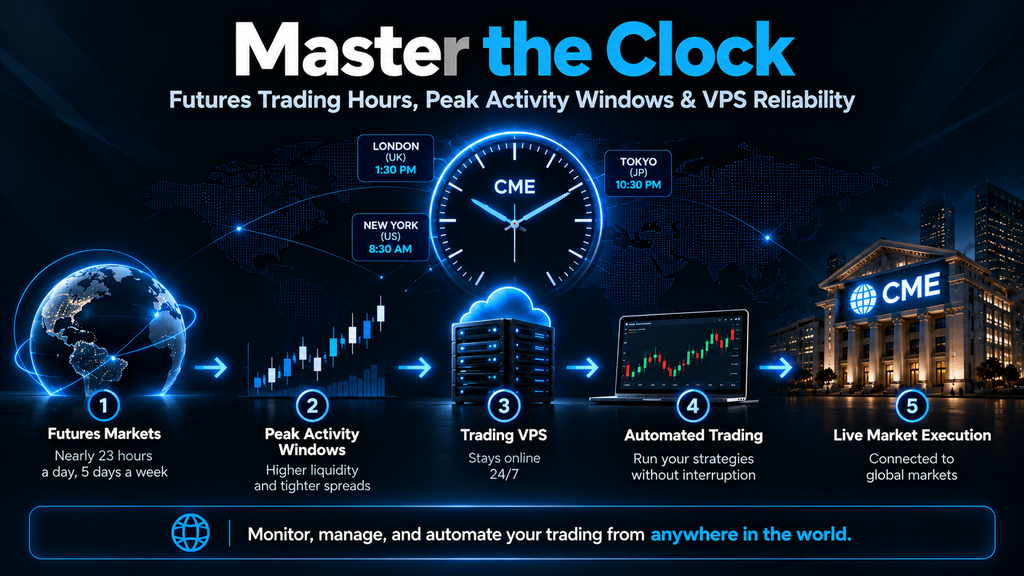
Major U.S. futures trade nearly 23 hours a day, five days a week. But the better question is not simply when you can trade—it is when your strategy has the best opportunity to execute efficiently. Liquidity, spreads, and volatility vary by contract, time of day, and scheduled catalysts.
For automated traders, timing also means keeping a platform online. A remote trading environment from TradingVPS.io can reduce dependence on a personal computer and home internet connection; it cannot guarantee fills or eliminate market risk.
1. Understanding the Futures Market Clock
- Typical weekly opening: Sunday, 6:00 PM ET.
- Typical weekly closing: Friday, 5:00 PM ET.
- Typical daily maintenance halt: Monday–Thursday, 5:00–6:00 PM ET.
These are common CME Globex schedules for the contract families discussed below, not a universal rule. Check the exact product calendar, holiday schedule, and broker requirements.
The evening reopen belongs to the next trade date
The 6:00 PM ET reopen commonly starts the next exchange trade date. That distinction can affect session labels, settlement reports, and trading-system logic.
Use a consistent time zone
Choose Eastern or Central Time as your canonical trading reference, and make sure charts, strategy rules, alerts, and maintenance jobs use a daylight-saving-aware time zone rather than a fixed UTC offset.
Overnight trading is real trading
Overnight sessions can contain meaningful international flow, but depth and spreads may differ substantially from U.S. cash-market hours.
2. Peak Activity Windows by Contract Family
The windows below are starting hypotheses for testing—not guaranteed periods of optimal execution.
| Contract | Prime window (ET) | Typical drivers |
| S&P 500 (ES / MES) | 9:30–11:30 AM; 3:00–4:00 PM | Cash equity open and close |
| Nasdaq-100 (NQ / MNQ) | 9:30–11:30 AM; 3:00–4:00 PM | Tech equities and index flow |
| Crude oil (CL / MCL) | 9:00–11:30 AM | U.S. energy activity; EIA inventories |
| Gold (GC / MGC) | 8:30–11:30 AM | Macro releases, USD, rates |
| 10-year T-note (ZN) | 7:30–11:00 AM | U.S. rates and macro releases |
| Euro FX (6E / M6E) | 8:00 AM–12:00 PM | London–New York overlap |
Most of these contracts commonly follow the Sunday evening–Friday afternoon electronic cycle with a daily 5:00–6:00 PM ET break, but verify contract-specific exceptions. Track active-contract rollover because liquidity migrates between expiries.
If your approach relies on short holding periods, see Scalping Futures with NinjaTrader: Why Speed, Precision, and a Low-Latency VPS Matter for a related discussion of execution infrastructure.
3. Economic News Changes the Trading Environment
- 8:30 AM ET: Many major U.S. macro releases, including CPI and employment data.
- 10:30 AM ET on most Wednesdays: EIA petroleum inventory data (check the official calendar for exceptions).
- 2:00 PM ET on scheduled FOMC decision days: Federal Reserve policy announcement; press conferences commonly follow.
Higher volume does not necessarily mean better fills. During fast announcements, visible order-book depth may disappear, spreads may widen, and stops can execute far from their trigger prices.
For more on infrastructure considerations around fast markets, read VPS Server for Futures Trading.
4. Danger Zones and Risk Controls
- Daily halt and immediate reopen: trading is unavailable during the halt, and liquidity can be thin after reopening.
- Weekend exposure: unexpected news can create gaps when trading resumes.
- Holidays and shortened sessions: liquidity may be lower and official hours can differ.
- Contract expiration and rollover: the expiring contract can lose volume even during an otherwise active time window.
Use broker-side or exchange-held protective orders where appropriate, and verify how your broker handles orders during trading halts and connectivity loss. A locally simulated stop may not protect you when the platform is offline.
5. How TradingVPS.io Fits a Futures Trading Routine
A VPS hosts a compatible trading application on a remote server so the trading environment can continue operating without your home PC staying on. This is especially useful for automated strategies, overnight monitoring, and traders who access their setup remotely.
- Platform continuity: reduce interruptions from local PC sleep, shutdown, and home-internet issues.
- Automation hosting: run compatible NinjaTrader configurations, custom Python processes, and other supported trading software subject to platform and broker requirements.
- Remote management: connect to your trading environment when away from your primary workstation.
- Consistent operations: keep trading workloads separate from routine desktop tasks.
A VPS does not guarantee uninterrupted operation, low latency to every broker, or profitable execution. Test connectivity and order routing for your specific broker, software, and contract.
Learn more about server location in Why Do Futures Traders Need Chicago VPS? and explore our VPS Trading guide for additional context.
Daily maintenance checklist
- Verify positions and working orders directly with the broker before taking the platform offline.
- Back up strategy settings, logs, and configuration files to separate storage.
- Apply necessary updates and reboot only when the strategy can safely be interrupted.
- Restart applications and reconnect market-data and order-routing services.
- Reconcile strategy state with actual positions; confirm feeds and automation status before the reopen.
The 5:00–6:00 PM ET halt may be a convenient maintenance window, but plan for overruns and do not assume broker connectivity or order management will behave identically during the halt.
6. Build Your Personal Trading Schedule
- Focus on one contract family and identify a structurally active two-hour window.
- Mark cash opens, macro releases, holidays, and rollover dates on your calendar.
- Record at least 30–50 trades, including slippage, spread cost, and fill quality.
- Compare nearby windows and keep the one that performs best after costs.
- For automated systems, test your VPS-to-broker connection and document recovery procedures.
For compatible VPS hosting options, visit TradingVPS.io.
Related Reading
- Why Do Futures Traders Need Chicago VPS?
- Scalping Futures with NinjaTrader
- VPS Server for Futures Trading
- VPS Trading
Trade at the Right Time. Keep Your Platform Ready.
A useful trading schedule combines market structure, execution analysis, risk management, and dependable infrastructure. A trading VPS can reduce some local-computer risks, but cannot remove exchange, broker, or market risk.
Explore VPS hosting for compatible trading platforms at TradingVPS.io.
Editorial note: Verify exchange hours and news schedules before publishing. TradingVPS.io links above are included as provided in the draft and should be checked for current availability.
Frequently Asked Questions (FAQs)
1. What time does the futures market open and close?
Most major CME futures markets, including E-mini S&P 500 (ES), Nasdaq-100 (NQ), crude oil (CL), and gold (GC), open on Sunday at 6:00 PM Eastern Time (ET) and close on Friday at 5:00 PM ET. These contracts generally trade nearly 23 hours per day, with a daily maintenance break from 5:00 PM to 6:00 PM ET, Monday through Thursday. Trading schedules can vary by contract and during holidays.
2. What is the best time of day to trade futures?
The best time to trade futures depends on the contract, trading strategy, and market conditions. For E-mini S&P 500 (ES) and Nasdaq-100 (NQ) futures, the 9:30 AM to 11:30 AM ET window is often highly active because it overlaps with the U.S. stock market opening. Another active period is 3:00 PM to 4:00 PM ET, when institutional trading and closing-related activity increase.
3. Can you trade futures 24 hours a day?
Not exactly. Most major CME futures contracts trade approximately 23 hours a day, five days a week. There is typically a one-hour daily maintenance break, and markets close over the weekend. Certain futures products have different trading schedules, so traders should always check the official CME Group trading hours.
4. What are the most volatile hours for futures trading?
Futures markets often experience significant volatility around scheduled economic announcements and major market openings. Important times include 8:30 AM ET for U.S. economic data, 9:30 AM ET for the U.S. equity market open, 10:30 AM ET on scheduled EIA petroleum inventory release days, and 2:00 PM ET for scheduled FOMC policy announcements. Higher volatility can create trading opportunities but also increases execution risk and potential slippage.
5. What is the best time to trade E-mini S&P 500 and Nasdaq futures?
For E-mini S&P 500 (ES) and Nasdaq-100 (NQ) futures, 9:30 AM to 11:30 AM ET and 3:00 PM to 4:00 PM ET are useful starting windows for testing trading strategies. These periods often feature increased trading volume and liquidity because of U.S. equity market activity. However, the most suitable window depends on your strategy and risk tolerance.
6. Why should futures traders use a VPS?
A Virtual Private Server (VPS) allows traders to run compatible trading platforms and automated strategies on a remote server rather than relying entirely on a personal computer. This can reduce interruptions caused by local internet outages, computer shutdowns, or power failures. A dedicated TradingVPS.io trading VPS can help traders maintain a more consistent environment for futures trading.
7. Can I run NinjaTrader on a trading VPS?
Yes. NinjaTrader can run on a compatible Windows VPS that meets its software and hardware requirements. Traders can use a VPS to host NinjaTrader strategies, monitor futures positions, and access their trading environment remotely. Learn more about scalping futures with NinjaTrader and a low-latency VPS.
8. Does a VPS reduce latency when trading futures?
A VPS may reduce network latency if it is hosted closer to your broker’s trading infrastructure or relevant exchange connectivity points. However, actual latency depends on server location, network routing, broker connections, and platform configuration. Traders interested in infrastructure location can read our guide on why futures traders use Chicago VPS hosting.
9. Can automated futures trading bots run overnight on a VPS?
Yes. Compatible automated trading systems can run on a VPS during overnight futures trading sessions without requiring your personal computer to remain powered on. However, trading bots still depend on active market sessions, functioning broker connections, and properly configured trading software. Traders should regularly monitor their automated strategies and maintain appropriate risk controls.
10. What happens to my trading bot during the CME maintenance break?
During the CME maintenance break, trading in affected futures contracts is temporarily unavailable. Your VPS and trading software may remain running, but strategies cannot execute trades on those halted markets. Automated trading systems should be configured to recognize exchange trading hours, manage session transitions, and reconnect appropriately when trading resumes.
11. Can I access my trading VPS while traveling?
Yes. A trading VPS can typically be accessed remotely through a compatible remote desktop application. This allows traders to monitor their platforms, check automated strategies, and manage their trading environment from different locations. With TradingVPS.io, traders can explore remote VPS hosting for compatible trading applications.
12. Is a trading VPS necessary for manual futures trading?
A VPS is not required for manual futures trading. Many traders successfully use their personal computers. However, a VPS may be useful for traders who want remote access, a dedicated trading environment, or support for automated strategies. Traders who depend on consistent platform availability may find remote hosting particularly beneficial.
13. How do I choose the right VPS for futures trading?
When choosing a VPS for futures trading, consider server location, network latency to your broker, CPU performance, RAM, storage speed, operating system compatibility, and support availability. Make sure the server meets your trading platform’s requirements. Explore TradingVPS.io to learn more about VPS hosting options for your trading setup.
14. Can a trading VPS prevent slippage during high-impact news events?
No. A VPS cannot eliminate slippage caused by market volatility, widening bid-ask spreads, or reduced order book liquidity. However, an appropriately configured VPS may help reduce delays associated with local hardware or internet connectivity. Traders should still use risk management rules and carefully evaluate whether their strategies are suitable for high-impact economic announcements.
15. What is the best way to combine futures trading hours with VPS hosting?
Start by identifying the most active trading windows for your preferred futures contracts. Then configure your trading platform and automated strategies around those sessions, including economic releases, maintenance breaks, and holiday schedules. Hosting compatible applications on TradingVPS.io can help maintain a consistent remote trading environment while you focus on strategy performance, execution quality, and risk management.